





An Order Ticket allows you to submit orders for contracts in a Market Grid, including the exchange and instrument name, order price and quantity, trading account, order type, and time-in-force.
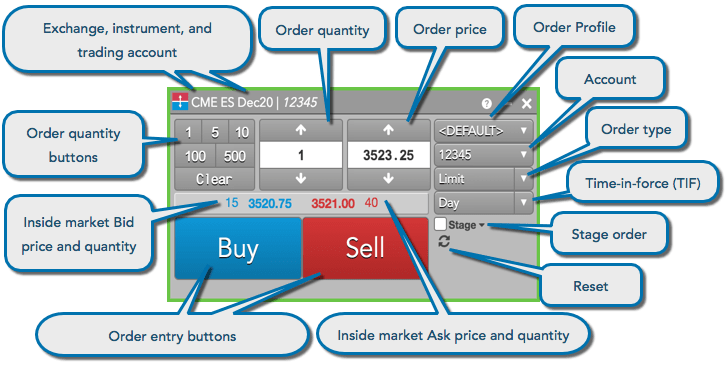
You can open an Order Ticket from the following widgets:
- Market Grid
- Time and Sales
- Options Chain
- Positions
- Spread Matrix
You can also open an Order Ticket for an instrument using the Search functionality, as well as from the main widget menu as an option in the “Order Management” section.
Note: If you open a non-tradeable contract, such as a spot contract or cash index, the Order Ticket displays the Price and Quantity fields with a maroon background and disables trading for the contract.