








The Order Ticket, Order Book, Fills, and Order and Fills widgets support the following care order user functionality:
- Submitting care orders
- Claiming and unclaiming care order
- Canceling or changing care orders
- Approving or rejecting a cancel or change request
- Assigning fills to a care order
- Submitting child orders for a care order
Before you begin, ensure you are showing the following buttons and columns in the Order Book or Order Book pane of the Order and Fills widget:
- Claim and Unclaim buttons
- Status, Originator, and CurrentUser columns
Care order accounts and related child orders
After claiming a care order in the Order Book, the owner can submit child orders related to the parent care order. Child orders may be sent to the exchange in the same account as the parent order, or sent from different accounts. Quantities of child orders may modified but their total sum cannot exceed the quantity of the parent order. The different accounts can be the owner’s native accounts that are inaccessible to the originator, or can be child accounts that are part of the same parent-child account hierarchy accessible to the originator.
Child orders can be sent in multiple accounts to fill the same staged order. If you use the account default or order profiles functionality, those predefined rules will seed the execution accounts based on markets, product types, and specific products.
Modify the price and quantity of native orders placed and managed by an algo that is working a parent care order. The price and quantity modifications abide by all current care order restrictions such as not exceeding the parent care order quantity and not exceeding price (when price is restricted).
Note: These native orders are considered “grandchildren” of the care order because they are actually placed and managed by the algo.
Care order fills
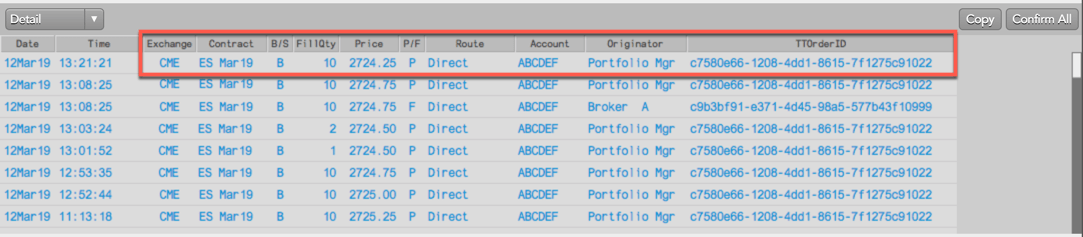
The care order owner and originator will both see the care order fills in their Fills widget or Fills pane in their Order and Fills widget. The owner can fill the care order by submitting related child orders or assigning their own fills, including manual fills using their own account or the same account as the originator. Based on which account the owner uses, the originator may also see the owner’s fills if they are associated with their care order.
Fills from different accounts
If the owner fills all or part of the care order using a different account from the originator’s account, the owner will see fills for both accounts. For example, the owner’s account “12345” and the originator’s account “ABCDEF”
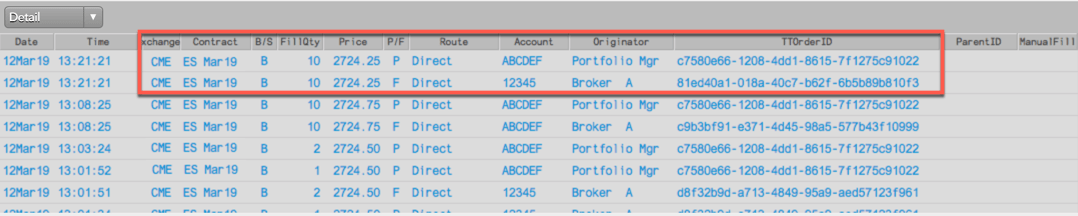
Because the owner used their own account to fill all or part of the care order, the originator sees just the fills for their own account (e.g., ABCDEF).
Fills from the same account
When the owner fills all or part of the care order from the same account as the originator’s account, the owner will see fills for both accounts. For example, account “ABCDEF” for the child order ID, and account “ABCDEF” for the care order ID.

Because the same account was used, the originator will also see both fills in their Fills pane.

Care orders in the Audit Trail
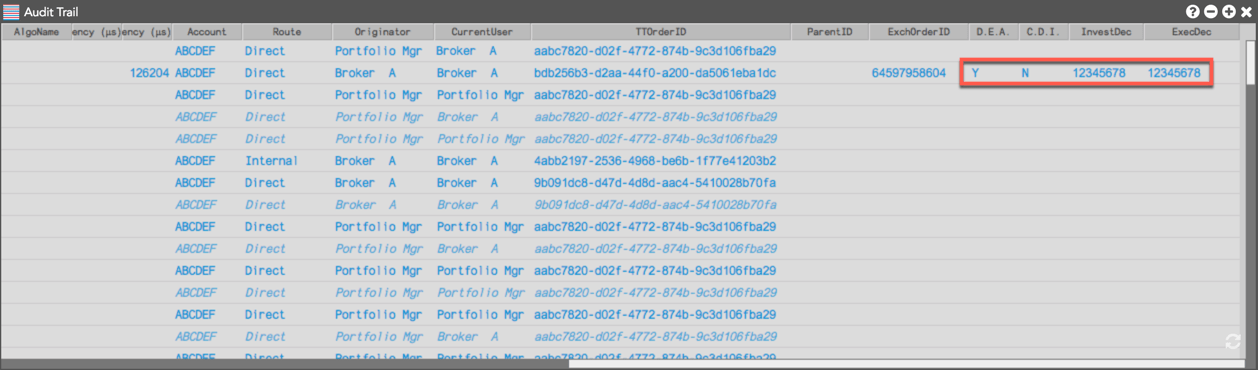
When owners work a staged order at any point in time, they have access to a full Audit Trail of the order. The Audit Trail includes information about when the order arrived and was claimed, as well as when the order was filled, modified, and/or canceled and replaced, etc.
If the owner has MiFID II tags associated with their order profile when submitting child orders related to a parent care order, those tags appear on the order and are sent to the exchange and appear in the Audit Trail.
TT OMS Time-In-Force
The TT OMS system manages care orders according to the Time-In-Force (TIF) set on each care order. For example, “Day” care orders will automatically be cancelled by TT at the end of the trading day and removed from the Order Book and/or the Orders and Fills widget (OFW).
TT will not automatically expire care orders that have unreleased fills. These orders will persist, requiring user action to resolve the pending notification.
TT OMS restricts child orders of care orders to have a Time-in-Force (TIF) that will expire along with the parent care order. This prevents creating child orders that could potentially work in the market for longer than the time of the care order and cause unwanted fills.
When care orders are combined via bulking or stitching, the resulting parent order’s Time-In-Force (TIF) will be seeded to the “longest” TIF among its child orders. This ensures that the child orders will expire in conjunction with the parent care order and not remain active after their parent care order expires.