







Managing FIX Sessions
Encrypted FIX connections to TT services
TT supports SSL-wrapped TCP connections for FIX connections. TT encrypted FIX utilizes server-side certificates only, similar to how most Secure HTTP (https) websites are implemented. Client certificates are not utilized or checked; client authentication occurs at the FIX protocol level utilizing SenderCompID in FIX tag 49 and password in FIX tag 96.
If your FIX engine natively supports SSL encryption, please consult the documentation for your FIX engine for configuration details. TT provides the TTFIX.crt file with the public certificates used by the TT® Platform FIX endpoint for customers’ use to minimize the risk of a Man-in-the-Middle attack.
If your FIX engine does not natively support SSL encryption, TT recommends using the open source stunnel proxy to implement the SSL encryption wrapper. Stunnel is available from https://www.stunnel.org/ and supports multiple operating systems, including Linux and Windows. Stunnel encrypts only the individual FIX connection, rather than implementing a full VPN tunnel as was traditionally used to encrypt FIX.
Creating FIX sessions
Before connecting your FIX client to TT FIX, the company administrator must create the FIX sessions that your FIX client will use. To create a FIX session:
- Log in to User Setup as a Company Administrator.
- From the Users drop down, select FIX Sessions.
- Choose + FIX Session and fill out the necessary fields. Use the Accounts tab to assign an account to a FIX Drop Copy session or use the Users tab to assign a user to an FIX Order Routing or FIX Inbound Drop Copy session.
For more information, see Adding a FIX Session.
Connecting to TT FIX
FIX clients can connect to TT FIX over a Secure TCP (SSL) connection using the following information. FIX clients can connect to the TT UAT environment via the Internet or stunnel; for the TT Production environment, clients can use stunnel.
| UAT | Production | |
|---|---|---|
| FIX Drop Copy | fixdropcopy-ext-uat-cert.trade.tt: 11501 / 11701 | fixdropcopy-ext-prod-live.trade.tt: 11701 |
| FIX Inbound Drop Copy | fixdropcopy-ext-uat-cert.trade.tt: 11506 / 11706 | fixdropcopy-ext-prod-live.trade.tt: 11706 |
| FIX Order Routing | fixorderrouting-ext-uat-cert.trade.tt: 11502 / 11702 | fixorderrouting-ext-prod-live.trade.tt: 11702 |
| FIX Market Data | fixmarketdata-ext-uat-cert.trade.tt: 11503 / 11703 | fixmarketdata-ext-prod-live.trade.tt: 11703 |
| FIX Recovery (Drop Copy) | fixrecovery-ext-uat-cert.trade.tt: 11505 / 11705 | fixrecovery-ext-prod-live.trade.tt: 11705 |
| FIX Recovery (Order Routing) | fixrecovery-ext-uat-cert.trade.tt: 11508 / 11708 | fixrecovery-ext-prod-live.trade.tt: 11708 |
| FIX Drop Copy (out) | fixdropcopy-ext-prod-sim.trade.tt: 11701 |
To configure connections for stunnel:
-
Install the stunnel software, if necessary.
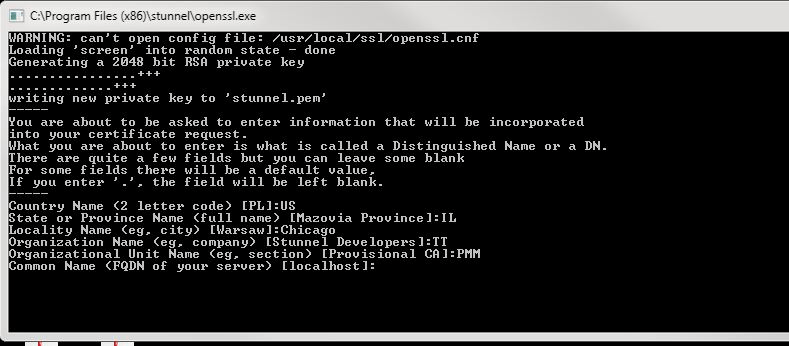
Note: The first time you install stunnel, you might receive a prompt similar to the following. If so, simply enter the appropriate information for your location and organization.
-
Download TT’s stunnel.zip file.
The zip file contains the TTFIX.crt public cert file and a sample stunnel client configuration file.
-
Copy the TTFIX.crt file to the appropriate location on your system.
-
Add the following to the stunnel configuration:
For TT FIX Drop Copy sessions:
[dcfix-tcp]

              client = yes

              accept = 127.0.0.1:11701

              connect = FullyQualifiedDomainName:port

              CAfile = TTFIX.crt

              verify = 3
where FullyQualifiedDomainName:port uses one of the values from the table above.
- fixdropcopy-ext-prod-live.trade.tt:11701 (for production)
- fixdropcopy-ext-uat-cert.trade.tt:11701 (for user-acceptance testing)
FIX clients should use the following connection information:
Host: 127.0.0.1
Port: 11701For TT FIX Inbound Drop Copy sessions:
[dcfix-tcp]

              client = yes

              accept = 127.0.0.1:11706

              connect = FullyQualifiedDomainName:port

              CAfile = TTFIX.crt

              verify = 3
where FullyQualifiedDomainName:port uses one of the values from the table above.
- fixdropcopy-ext-prod-live.trade.tt:11706 (for production)
- fixdropcopy-ext-uat-cert.trade.tt:11706 (for user-acceptance testing)
FIX clients should use the following connection information:
Host: 127.0.0.1
Port: 11706For TT FIX Order Routing sessions:
[orfix-tcp]

              client = yes

              accept = 127.0.0.1:11702

              connect = FullyQualifiedDomainName:port

              CAfile = TTFIX.crt

              verify = 3
where FullyQualifiedDomainName:port uses one of the values from the table above.
- fixorderrouting-ext-prod-live.trade.tt:11702 (for production)
- fixorderrouting-ext-uat-cert.trade.tt:11702 (for user-acceptance testing)
FIX clients should use the following connection information:
Host: 127.0.0.1
Port: 11702For TT FIX Market Data sessions:
[mdfix-tcp]

              client = yes

              accept = 127.0.0.1:11703

              connect = FullyQualifiedDomainName:port

              CAfile = TTFIX.crt

              verify = 3
where FullyQualifiedDomainName:port uses one of the values from the table above.
- fixmarketdata-ext-prod-live.trade.tt:11703 (for production)
- fixmarketdata-ext-uat-cert.trade.tt:11703 (for user-acceptance testing)
FIX clients should use the following connection information:
Host: 127.0.0.1
Port: 11703-
For TT FIX Recovery (Drop Copy) sessions:
[recoveryfix-tcp]

                        client = yes

                        accept = 127.0.0.1:11705

                        connect = FullyQualifiedDomainName:port

                        CAfile = TTFIX.crt

                        verify = 3
where FullyQualifiedDomainName:port uses one of the values from the table above.
- fixsecurityinfo-ext-prod-live.trade.tt:1170 (for production)
- fixsecurityinfo-ext-uat-cert.trade.tt:11703 (for user-acceptance testing)
FIX clients should use the following connection information:
Host: 127.0.0.1
Port: 11705 -
For TT FIX Recovery (Order Routing) sessions:
[recoveryfix-tcp]

                        client = yes

                        accept = 127.0.0.1:11708

                        connect = FullyQualifiedDomainName:port

                        CAfile = TTFIX.crt

                        verify = 3
where FullyQualifiedDomainName:port uses one of the values from the table above.
- fixsecurityinfo-ext-prod-live.trade.tt:1170 (for production)
- fixsecurityinfo-ext-uat-cert.trade.tt:11703 (for user-acceptance testing)
FIX clients should use the following connection information:
Host: 127.0.0.1
Port: 11708 For TT FIX Drop Copy (out) sessions:
[dcofix-tcp]

              client = yes

              accept = 127.0.0.1:11701

              connect = FullyQualifiedDomainName:port

              CAfile = TTFIX.crt

              verify = 3
where FullyQualifiedDomainName:port uses the value from the table above.
- fixsecurityinfo-ext-prod-live.trade.tt:11703 (for production)
- fixsecurityinfo-ext-uat-cert.trade.tt:11703 (for user-acceptance testing)
FIX clients should use the following connection information:
Host: 127.0.0.1
Port: 11703
All connections through these ports are encrypted. Port 443 is also open for these URLs.