








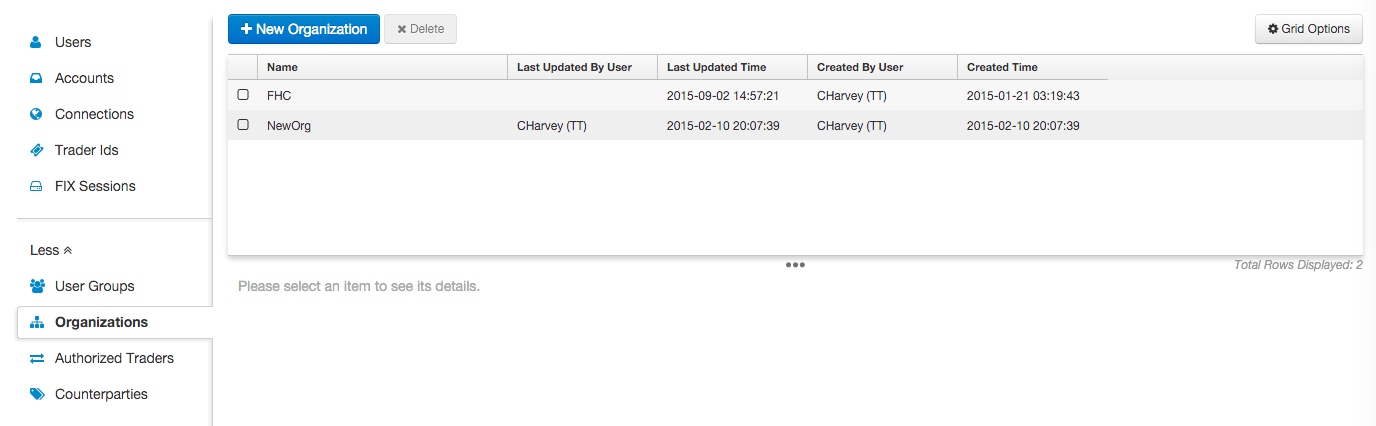
Use the Organizations tab to add, view, and edit a list of organizations available to your company. This tab provides a shortcut to the Manage Organizations settings available at Users | Exchanges | CME | Market Data.
Adding an organization
- To access the Organizations tab, click More in the left navigation panel and click Organizations.
- Click +New Organization.
- Enter an organization name and click Save.
- Click Exchanges.
Note: Only exchanges that support participant netting agreements appear in the drop-down. After TT has verified the netting program participant with the exchange, this tab lists the netting product groups that have been approved by the CME.
Deleting an organization
- To access the Organizations tab, click More in the left navigation panel and click Organizations.
- Click to select an organization in the data grid.
- Click Delete.