









As a company administrator, use the settings on the Accounts | SOD/Credit tab to:
- Define the daily credit limit and currency for an account (parent or child account).
- Set whether the available credit for an account is calculated using P/L and/or product margin set by the company.
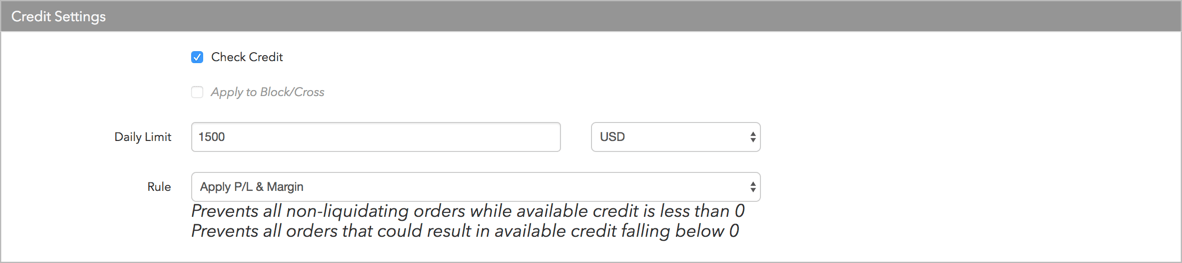
The Setup application calculates “available credit” for an account based on your settings. The Daily Limit setting represents a daily starting credit limit, but “available credit” is calculated by adding profits, subtracting losses, and/or subtracting product margin from the starting limit depending on what settings you choose for the account. Credit check is enabled in the Credit Settings section.
Note: Credit limits are applied in aggregate to an account with sub-accounts.
Credit limit settings
When checking risk limits by credit, TT software uses the following parameters to determine if an order should be accepted or rejected:
- Check Credit — Check (enable) this checkbox to apply credit limit checks to all orders.
- Apply to Block/Cross Orders — Check this checkbox to apply the credit limits to all Block or Cross orders. If unchecked, user credit does not apply to these orders.
- Daily Limit — Determines the daily credit amount the account can have during a given trading session. Enter a number (zero or greater). Select a currency for the credit limit from the drop down menu next to this field.
- Rule — Select one of the following methods for calculating available credit:
- Apply P/L — Uses the P/L formula to determine available credit. If selected, then any profits or losses (realized and unrealized) that accrue during the day are added or subtracted from the account’s available credit. If this is checked, then the credit limit acts as a pure daily loss limit. Prevents all non-liquidating orders while available credit is less than 0.
- Apply Margin Limit — Considers product margin limits set by the company when determining available credit per trading session. This setting deducts product margin from the account’s available credit based on the worst case net positions in various products. Prevents all orders that could result in available credit falling below 0.
Apply P/L & Margin — If margin and P/L are both included in the credit check per trading session, then available credit = daily credit +/- P/L – margin. Select this option as a balance if credit is updated daily in one of two ways: Manually by your firm, or automatically marking-to-market by adding yesterday’s P/L to today’s credit and representing yesterday’s position at the settlement price.
Upon entering an order, margin is calculated on a worst-case basis, applying outright margin to working uneven spreads, outright orders, and worst-case outright positions. Spread/strategy margin is applied to working even spreads and synthetic spread positions (e.g., a 1-lot long position in Sep 16 and a 1-lot short position in Dec 16 only requires one times the current spread margin value). If a new order would cause available credit to drop at or below zero, then the order is rejected unless the only possible result of the order being filled would be to reduce the position in all affected contracts without increasing the gross or net position of any products (requires Trade out allowed enabled).
- Apply pre-trade SPAN margin — Incorporates both P/L and margin where margin values are calculated via portfolio risk calculation using values supplied by the exchange. Requires Cash Balances values to be set. Does not support all exchanges. For more details please see Pre-Trade Portfolio Risk.
Calculating Margin
TT uses the following formulas to calculate the total Margin for a product using Intra-Product Spread Margining:
- Worst Case Net Product Position * (Future Margin * Outright Applied Margin %) = Future Margin Required
- Synthetic Spread Position * (Spread Margin * Spread Applied Margin %) = Synthetic Spread Margin Required
- Even-legged Exchange Spreads * (Spread Margin * Spread Applied Margin %) = Spread Margin Required
Note: These calculations also apply to Options and Strategy Margins.
Calculating Available Credit
TT uses the following formula to calculate available credit for users:
Credit +/- Overall P&L – Future Margin Required – Synthetic Spread Margin Required – Spread Margin Required = Available Credit
If an account’s available credit is less than zero, the account is not allowed to be used for trading.
Calculating Available Credit: Example 1
An account has the following risk limits:
- Credit is 5,000 USD
- The rule is Apply P/L & Margin
- Product is ES
- Margin is 4,000 USD
- P/L is 7,500 USD
- No existing positions
Question: Can the account be used to buy 3 Futures contracts?
- Worst Case Net Product Position * Future Margin = Future Margin Required
(3 * 4,000 USD = 12,000 USD)
- Credit Limit + P&L – Future Margin required = Available Credit (5,000 USD + 7,500 USD – 12,000 USD = 500 USD available credit.)
Result: Available Credit is greater than zero (0), so the order is accepted.
Calculating Available Credit: Example 2
Assume the previous order was filled and the current Jun ES position is long 3. Now the trader wants to use the account to buy one (1) JUN-SEP ES exchange-traded spread:
- Credit is 5,000 USD
- The rule is Apply P/L & Margin
- Future Margin is 4,000 USD
- Spread Margin is 2,000 USD
- P/L is 7,500 USD
- Position is long 3
Question: Can the account be used to buy 1 JUN-SEP ES spread?
- Worst Case Net Product Position * Future Margin = Future Margin Required
(3 * 4,000 USD = 12,000 USD)
- Even-legged Exchange Spreads * Spread Margin = Spread Margin Required.
(1 * 2,000 USD = 2,000 USD)
- Credit Limit + P/L – Future Margin required – Spread Margin Required = Available Credit
(5,000 USD + 7,500 USD – 12,000 USD – 2,000 USD = -1500 USD available credit)
Result: Available Credit is less than zero (0), so the order is rejected.
Applied Margin
Margin is the amount of money that is required by the company to hold a position. Margin requirements are set by the exchange and differ by product. The risk manager (company administrator in TT) can set margin limits per product or upload product margin CSV files for your company based on exchange requirements.
Applied Margin allows risk managers to increase or decrease margin requirements when calculating risk limits for traders, and can be set on Accounts | Limits tab in Setup.
For example, the margin for a particular product is 4000 USD and a trader’s applied margin percentge increaase/decrease has been set as = 50
| Applied Margin Percentage is… | Margin * Applied Margin = Total Margin |
|---|---|
| +100 | $4,000 total margin required when placing a 1-lot order |
| 50% | $4,000 *50% = $2000 total margin required when placing a 1-lot order. |
| 0 % | $4,000 * 0 = $0 total margin required when placing a 1-lot order |
| 200% | $4,000 *200% = $8000 total margin required when placing a 1-lot order. |
Applied Margin: Example 1
An account has the following risk limits:
- Credit is 5,000 USD
- The rule is Apply P/L & Margin
- Product is ES
- Margin is 4,000 USD
- Additional Margin (%) is 30%
- P/L is 7,500 USD
- No existing positions
Question: Can the account be used to buy 3 Futures contracts?
Calculation:
- Future Margin * Additional Future Margin % = Additional Future Margin Requirements
(4,000 USD *30% = 1,200 USD)
- Worst Case Net Product Position * (Future Margin +/- Additional Future Margin Requirements) = Future Margin Required.
(3 * (4,000 USD + 1,200 USD) = 15,600 USD)
- Credit Limit + P/L – Future Margin required = Available Credit
(5,000 USD + 7,500 USD -15,600 USD = -3100 USD available credit)
Result: Available Credit is less than zero (0), so the order is rejected.
Applied Margin: Example 2
An account has the following risk limits and no positions:
- Credit is 5,000 USD
- The rule is Apply P/L & Margin
- Product is ES
- Margin is 4,000 USD
- Additional Margin (%) is -100
- P/L is 7,500 USD
- No existing positions
Question: Can the account be used to sell 100 Futures contracts?
Calculation:
- Future Margin required = 0 USD (as additional margin is set to – 100)
- Credit Limit + P&L – Future Margin required = Available Credit
(5,000 USD + 7,500 USD – 0 USD = 12,500 USD available credit)
Result: Available Credit is greater than zero (0), so the order is accepted.
Applied Margin: Example 3
A trader has the following risk limits and position:
- Credit is 1,200 USD
- The rule is Apply P/L & Margin
Product is NQ - Spread Margin is 60 USD; Future Margin is 100 USD
- Outright Applied Margin (%) is 50%
- Spread Applied Margin (%) is 25
The trader has bought 5 MAR Futures, sold 12 JUN Futures, and bought 10 MAR-JUN exchange-traded spreads:
| Contract Month | Long | Short | Position |
|---|---|---|---|
| MAR | 15 | 0 | Long 15 |
| JUN | 0 | 22 | Short 22 |
| MAR + JUN | 15 | 22 | Short 7 |
Question: Can the trader sell 1 JUN Future?
- Future Margin * Outright Applied Margin % = Future Margin Requirements
(100 USD *50% = 50 USD)
- Worst Case Net Product Position * (Future Margin Requirements) = Future Margin Required.
(7+1) USD * (50 USD) = 400 USD
- Synthetic Spread Position * Spread AppliedMargin % = Synthetic Spread Margin Requirements
60 USD *75% = 45 USD
- Synthetic Spread Position * (Synthetic Spread Margin Requirements) = Synthetic Spread Margin Required.
15 * (45 USD) = 675 USD
- Credit Limit + P/L – Future Margin required – Synthetic Spread Margin Required = Available Credit
1200 USD + 0 USD – 400 USD – 675 = 125 USD available credit
Result: Available Credit is greater than zero (0), so the order is accepted.
Cash Balance
The Cash Balance values are utilized when the credit rule Apply pre-trade SPAN margin has been applied.
Liquidating Value acts as the credit limit for the account and is required to be set.
The other fields are informational – these are used to form the values displayed in the Balances widget.
Intraday Cash Adjustment can be used for a one-time addition or subtraction credit from an account between any regular updates using file upload or REST API.

- SOD Cash — Total cash account balance at the start of the day.
- Security Collateral Value — The margin value of any securities (e.g. T-Bills) in the account, normally 95% of the face value.
- Open Trade Equity — The open trade equity (marked to market P/L) of non-Options positions, calculated using midpoint.
- Long Option Value — The net value of open long option positions, displayed for supported markets.
- Short Option Value — The net value of open short option positions, displayed for supported markets.
- Net Option Value — The net value of open option positions, displayed for supported markets.
- Liquidating Value — The value of the account if all positions were liquidated based on the estimated fill settlement prices.
- Total Equity — The total trade equity (marked to market P/L) on open positions plus total balance.
- Initial Margin Requirement — The margin equity needed to initiate a position.
- Maintenance Margin Requirement — The minimum margin equity required to be maintained by an account.
- Intraday Cash Adjustment — Used for a one-time addition or subtraction credit from an account.