


Trade
Overview
TT Platform
Description
Task
Browser Access
Description
Task
Videos
TT Desktop
Description
Task
Videos
Reference
Workspace Windows
Description
Task
Videos
Widgets
Description
Task
Preferences
Description
Viewing Market Data
Time and Sales
Task
Reference
Description
Depth
Description
Task
Reference
Market Grid
Description
Task
Videos
Reference
Product Grid
Description
Task
Reference
Spread Matrix
Description
Task
Videos
Reference
Position in Queue (PIQ)
Basic Order Entry
TT Order Types
Description
Task
Videos
Reference
Case Studies
TT Premium Order Types
Description
Task
Reference
Order Ticket
Description
Task
Use Cases
Reference
MD Trader®
Description
Task
Videos
Reference
Order Profiles
Description
Task
Reference
Routing Rules
Description
Task
Blocktrader
Description
Task
Videos
Reference
Trading Crypto on TT
Description
Task
Videos
Reference
Trading on B3
Order Management
Order Book
Description
Task
Reference
Floating Order Book
Description
Task
Reference
Fills
Description
Task
Reference
Positions
Description
Task
Reference
Orders and Fills
Description
Task
Reference
Audit Trail
Description
Task
Reference
Audit Query
Description
Task
Reference
Account List
Description
Task
Videos
Reference
Position Manager
Description
Task
Reference
Alert Manager and Alert Viewer
Description
Task
Videos
Reference
Account & User Restrictions
Description
Task
Reference
Balances
Description
Task
Reference
TT® OMS
Care Orders
Description
Task
Videos
Reference
Lock and Release
Description
Task
Bulking
Description
Task
Videos
Stitching and Splitting
Description
Task
Combining
Description
Task
Order Passing
Description
Task
Use Cases
Order Exceptions
Description
Task
Options
Options Risk
Description
Task
Videos
Reference
QuikStrike
Description
Task
TT Uncovered 3.0
Description
Task
TT Uncovered 2.0
Description
Task
Volatility Calculator
Description
Task
Expiration Manager
Description
Task
Watchlist
Description
Task
Videos
Reference
Options Risk Matrix
Description
Task
Videos
Reference
Options on TT
Description
Videos
Strategy Creation
Description
Task
Use Cases
Reference
Counterparty Manager
Description
Task
RFQ with Counterparties
Description
Task
RFQ Viewer
Description
Task
Videos
Reference
Electronic Eye
Description
Task
Videos
Reference
Vol Curve Manager
Description
Task
Use Cases
Videos
Reference
Options Trade Monitor
Description
Task
Videos
Reference
Options Chain
Description
Task
Use Cases
Videos
Reference
Spread Trading
Autospreader
Description
Task
Use Cases
Videos
Reference
Autospreader Rules
Description
Task
Videos
Reference
Hedge Manager
Description
Task
Videos
Reference
Trading in Yield
Description
Task
Use Cases
Reference
Aggregator
Description
Task
Videos
Reference
Algo Trading
Algo Dashboard
Description
Task
Videos
Reference
Template Manager
Description
Task
Order Management Algos (OMAs)
Autotrader
Description
Task
Reference
Videos
Excel integration with TT
Description
Task
Videos
Reference
Market-Making Algos
Analytics
Charts
Description
Technical Indicators
Task
Videos
Reference
Trader Analytics
Description
Task
Reference
ADL
ADL Overview
Introduction to ADL
Description
Task
Videos
Reference
ADL Basic Concepts
Description
Task
Reference
Building your first algo
Lessons
Advanced concepts
Description
Task
Case Studies
Jump blocks
Group blocks
Virtualized blocks
Library blocks
Trading Blocks
Discrete blocks
Arithmetic blocks
Basic blocks
Logic blocks
Miscellaneous blocks
Setup
Setup Overview
Getting Started
Description
Task
Videos
Reference
Supported Order Types and TIFs
Company Administration
Connections
Description
Task
Videos
Reference
Accounts
Description
Task
Videos
Use Cases
Reference
Users
Description
Task
Videos
Reference
Company
Description
Task
Reference
Order Tag Defaults
Description
Task
Account Administrators
Description
Task
TT Premium Services
Description
Task
TT Access
Description
Task
Advanced Features
Description
Risk Management
Risk Administration
Description
Task
Risk Limits
Description
Task
Videos
Reference
Pre-Trade Portfolio Risk
Description
Task
Reference
Order Cross Prevention
Description
Task
Videos
KRM Limits
Description
Task
TT® OMS
TT OMS Administration
Description
Task
Use Cases
Reference
Exchanges: Americas
FMX
Description
Task
NFI
Task
Nodal
Description
Task
MX
Description
Task
MIAX_FUT_NY
Description
Task
MIAX_FUT_CH
Description
Task
MexDer
Description
Task
ICE
Description
Task
Goldman Sachs Commodity Blocks (GSCB)
Description
Task
Referece
FMX_USTF
Description
Task
B3
Description
Task
Fenics
Description
Task
EBS Market
Description
Task
EBS Direct
Description
Task
Dealerweb
Description
Task
CME
Description
Task
CFE
Description
Task
Cboe FX
Description
Task
Reference
CBOE
Description
Task
Exchanges: EMEA
ICE_L
Description
Task
WSE
Description
Task
Nord Pool
Description
Task
Reference
NASDAQ_NED
Description
Task
NDAQ_EU
Description
Task
MEFF
Description
Task
LSE
Description
Task
LME NTP
Description
Task
LME
Description
Task
JSE
Description
Task
ATHEX
Description
Task
GFO-X
Description
Task
Euronext
Description
Task
Eurex
Description
Task
Videos
Eris
Description
Task
EPEX SPOT
Description
Task
Reference
EEX
Description
Task
DGCX
Description
Task
BIST
Description
Task
Exchanges: Asia/Pacific
ABX
Description
Task
ASX
Description
Task
FEX
Description
Task
HKEx
Description
Task
JPX
Description
Task
NSE
Description
Task
NZX
Description
Task
SGX
Description
Task
SGX GIFT
Description
Task
TAIFEX
Description
Task
TFEX
Description
Task
TFX
Description
Task
CoinFLEX
Task
Exchanges: Crypto
Coinbase
Description
Task
Kraken
Description
Task
FIX Support
FIX Ruleset
Description
Task
FIX Sessions
Description
Task
Secondary Accounts
Description
Task
Monitor
TT Mobile
TT Backtesting
APIs
TT REST API 2.0
Getting Started
API Reference
TT REST API 2.0 (UAT)
Getting Started
API Reference
TT .NET SDK
Getting started with TT .NET SDK
Creating the application framework
Working with instruments
Subscribing for market data
More about prices
An in-depth look at the Price class
Working with orders and fills
Handling trade subscriptions
Working with trade subscriptions
Working with Algos
Algo Server
TT Order Types
TT Premium Order Types
Advanced Concepts and Options
Appendix
TT CORE SDK
Getting Started with TT Core SDK
Creating Application Framework
Working With Instruments
Subscribing for Market Data
Working with Orders and Fills
Creating a TT Application Server
Appendix
TT Trade Surveillance
Overview
Using TT Trade Surveillance
Cluster View
Core Models
Market Abuse Models
Cross Product Models
Spoofing Models
Improperly Matched Trade Models
Market Rate Models
Trading Behaviors Models
Miscellaneous Models
Configurable Models
Reports
Reference
TT FIX Services
TT FIX General
Getting Started
FIX Message Structure
Session messages
TT FIX Order Routing
Overview
TT FIX message conversations
Supported application messages
TT FIX Market Data
Overview
TT FIX message conversations
Supported application messages
TT FIX Drop Copy Out
Overview
TT FIX Message Conversations
Supported application messages
Compliance Feed messages
TT FIX Drop Copy In
Overview
Supported application messages
TT FIX Gateway
Getting Started
FIX Message Structure
Components
Session messages
Price Gateway Messages
Order Gateway Messages
TT FIX Recovery
Overview
FIX Recovery Methods
Supported application messages
Compliance Feed Messages
MiFID II Support

Eurex EnLight Quoting and Response Messages

Contents

Preparation Notes

  • Ensure that the counterparty is correctly populated in TT Setup under the Counterparties section.
  • Download the latest version of the TT FIX schema.
  • Refer to the schema for the tags related to the quoting and response messages.
  • Specify tag 537 (QuoteType) to indicate whether the RFQ type is Firm or Indicative.

(back to top)

Sample Flow with Messages

Below is an example of the FIX order routing flow when sending RFQ and receiving quotes; subsequently sending the quote responses and receiving the confirmation. These messages are from the requester’s point of view.

Note The Eurex Trader Admin GUI – EnLight Responder Interface section provides the respondent’s point of view in the Eurex Admin GUI.

  1. Requester sends a Quote Request (35=R) message:

  2. Tags:

  • 537 (QuoteType) — Must come before tags 1, 1461 and 1462.
  • 1462 (TargetPartyExchangeTraderID)
  • 18605 (SRFQTransType) — Must be set to ‘1’ in 35=R messages for EnLight; otherwise, it will be treated as a regular quote message. ‘1’ is currently the only supported value for this tag.

Send:

8=FIX.4.2|9=190|35=R|49=Session123|56=TT_OR|34=3440|52=20241009-07:25:57|131=1352684283|146=1|55=FESX|167=FUT|200=202503|207=Eurex|54=1|38=5000|18605=1|537=1|1=Account123|116=SubID123|1461=1|1462=TTGXVZZZ003|10=193|

If successful, requester receives a Quote Status Report (35=AI) message with 297=0 (Accepted).

Tags:

  • 276 (QuoteCondition)
  • 297 (QuoteStatus)
  • 18605 (SRFQTransType)
  • 18606 (NegotiationID)
  • 18607 (SecondaryNegotiationID)

Recv:

8=FIX.4.2|9=00699|35=AI|49=TT_OR|56=Session123|34=4997|50=5498|142=SG|52=20241009-07:25:57.181|129=SubID123|131=1352684283|1=Account123|18221=DTS|18220=DTS|10553=traderemail@dotcom|16117=10|38=5000|54=1|60=20241009-07:25:57.144312|18605=1|1461=1|1462=TTGXVZZZ003|18606=f72d89ba-114f-4bd5-9c87-9719a3a9b5a9|18607=2|297=0|16963=2|276=A|55=FESX|48=3188186039303792532|22=96|454=7|455=2519059|456=98|455=FESX Mar25|456=97|455=XF00000N8054|456=4|455=STXEH5|456=5|455=2519059|456=8|455=VGH5 Index|456=A|16207=EUX|455=BBG017Q95K87|456=S|16207=EUX|460=5|461=FFICSX|167=FUT|200=202503|541=20250320|205=20|18223=202503|18211=M|207=Eurex|100=XEUR|107=EURO STOXX 50 Index|15=EUR|453=1|448=TRAXVSIM003|452=218|447=D|10=138|

  • Respondent responds and requester receives Market Quote (35=S) message:

  • Tags:

    • 132 (BidPx)
    • 133 (OfferPx)
    • 134 (BidSize)
    • 135 (OfferSize)
    • 18606 (NegotiationID)
    • 18607 (SecondaryNegotiationID)
    • 18608 (MkQuoteID)
    • 18609 (SecondaryQuoteID)
    • 18610 (QuotingStatus)

    Recv:

    8=FIX.4.2|9=00700|35=S|49=TT_OR|56=Session123|34=4999|52=20241009-07:26:50.786|129=SubID123|1=Account123|18221=DTS|18220=DTS|10553=traderemail@dotcom
    |1028=Y|132=5150|133=5160|134=5000|135=5000|1462=TTGXVZZZ003|18606=f72d89ba-114f-4bd5-9c87-9719a3a9b5a9|18610=1|18607=2|18608=d4cc4a65-b183-4818-9e6b-9d902009205e|16963=1|131=1352684283|18609=2|60=20241009-07:26:50.747148|55=FESX|48=3188186039303792532|22=96|454=7|455=2519059|456=98|455=FESX Mar25|456=97|455=XF00000N8054|456=4|455=STXEH5|456=5|455=2519059|456=8|455=VGH5 Index|456=A|16207=EUX|455=BBG017Q95K87|456=S|16207=EUX|460=5|461=FFICSX|167=FUT|200=202503|541=20250320|205=20|18223=202503|18211=M|207=Eurex|100=XEUR|107=EURO STOXX 50 Index|15=EUR|10=003|

  • Requester submits Quote Response (35=AJ) (decision):

  • Note If the intention is to buy, submit the price and quantity in tags 132 (BidPx) and 134 (BidSize). If the intention is to sell, use tags 133 (OfferPx) and 135 (OfferSize). In this example, since the respondent gave a quote with an OfferPx at 5160, the requester puts that in his BidPx so they can lift that offer.

    Send:

    8=FIX.4.2|9=300|35=AJ|49=Session123|56=TT_OR|34=3454|52=20241009-07:31:40|1=Account123|18610=1|132=5160|134=5000|1462=TTGXVZZZ003|18606=f72d89ba-114f-4bd5-9c87-9719a3a9b5a9|18607=2|18608=d4cc4a65-b183-4818-9e6b-9d902009205e|18609=2|55=FESX|460=12|167=FUT|200=202503|207=Eurex|30=XEUR|461=FFICSX|15=EUR|131=1352684283|10=127|

  • Requester receives Trade Capture Ack (35=AR) followed by Trade Capture Report (35=AE) and then a quote status report:

  • Recv:
    8=FIX.4.2|9=00960|35=AR|49=TT_OR|56=Session123|34=5009|50=5498|52=20241009-07:31:40.951|129=SubID123|571=81931164-19e5-4407-8001-4022c09fba12|818=1728404726178|487=0|856=2|939=0|60=20241009-07:31:40.913826|483=20241009-07:31:40.000000|55=FESX|48=3188186039303792532|454=7|455=2519059|456=98|455=FESX Mar25|456=97|455=XF00000N8054|456=4|455=STXEH5|456=5|455=2519059|456=8|455=VGH5 Index|456=A|16207=EUX|455=BBG017Q95K87|456=S|16207=EUX|460=5|461=FFICSX|167=FUT|200=202503|541=20250320|205=20|18223=202503|18211=M|207=Eurex|100=XEUR|107=EURO STOXX 50 Index|15=EUR|31=5160|32=5000|552=1|54=1|453=5|448=A1|452=200|447=D|448=755857|452=3|447=D|448=797463|452=122|2376=24|447=D|448=786521|452=12|2376=24|447=D|448=TTGXVZZZ003|452=37|447=D|1=Account123|80=5000|1047=O|1152=0|16849=TEXT A|18608=d4cc4a65-b183-4818-9e6b-9d902009205e|18609=2|18218=|16963=2|18221=DTS_ID|18220=DTS|10553=traderemail@dotcom|828=1082|18606=f72d89ba-114f-4bd5-9c87-9719a3a9b5a9|18607=2|10=043|

    Recv:
    8=FIX.4.2|9=01034|35=AE|49=TT_OR|56=Session123|34=5010|50=5498|52=20241009-07:31:40.951|129=SubID123|571=23647e1a-b405-4544-9141-8a6904fb08f0|487=0|856=0|1123=3|828=1082|31=5160|32=5000|60=20241009-07:31:40.913826|572=81931164-19e5-4407-8001-4022c09fba12|818=1728404726180|483=20241009-07:31:40.000000|55=FESX|48=3188186039303792532|22=96|454=7|455=2519059|456=98|455=FESX Mar25|456=97|455=XF00000N8054|456=4|455=STXEH5|456=5|455=2519059|456=8|455=VGH5 Index|456=A|16207=EUX|455=BBG017Q95K87|456=S|16207=EUX|460=5|461=FFICSX|167=FUT|200=202503|541=20250320|205=20|18223=202503|18211=M|207=Eurex|100=XEUR|107=EURO STOXX 50 Index|15=EUR|552=1|54=1|453=5|448=A1|452=200|447=D|448=755857|452=3|447=D|448=797463|452=122|2376=24|447=D|448=786521|452=12|2376=24|447=D|448=TTGXVZZZ003|452=37|447=D|1=Account123|80=5000|1047=O|18218=|16849=TEXT A|18608=d4cc4a65-b183-4818-9e6b-9d902009205e|18609=2|18228=rtgacct123|18221=DTS_ID|18220=DTS|18218=|16963=1|10553=traderemail@dotcom|18606=f72d89ba-114f-4bd5-9c87-9719a3a9b5a9|18607=2|10=076|

    Recv:
    8=FIX.4.2|9=00705|35=AI|49=TT_OR|56=Session123|34=5011|50=5498|142=SG|52=20241009-07:31:40.951|129=SubID123|131=1352684283|1=Account123|18221=DTS|18220=DTS|10553=traderemail@dotcom|16117=10|38=5000|54=1|60=20241009-07:31:40.911495|151=0|18605=4|1461=1|1462=TTGXVZZZ003|18606=f72d89ba-114f-4bd5-9c87-9719a3a9b5a9|18607=2|297=0|16963=3|276=A|55=FESX|48=3188186039303792532|22=96|454=7|455=2519059|456=98|455=FESX Mar25|456=97|455=XF00000N8054|456=4|455=STXEH5|456=5|455=2519059|456=8|455=VGH5 Index|456=A|16207=EUX|455=BBG017Q95K87|456=S|16207=EUX|460=5|461=FFICSX|167=FUT|200=202503|541=20250320|205=20|18223=202503|18211=M|207=Eurex|100=XEUR|107=EURO STOXX 50 Index|15=EUR|453=1|448=TRAXVSIM003|452=218|447=D|10=110|

  • Respondent confirms requester’s OTC order.

  • Requester receives messages (in this order):

    1. Trade Capture Report (35=AE) with Trade Confirmation (1123=0).
    2. Quote Status Reports (35=AI) indicating the status transitioning to close (276=B).
    3. A Quote (35=S) Response confirming that the original quote is now closed.
  • Recv:
    8=FIX.4.2|9=01036|35=AE|49=TT_OR|56=Session123|34=5013|50=5498|52=20241009-07:32:21.225|129=SubID123|571=23647e1a-b405-4544-9141-8a6904fb08f0|487=103|856=2|1123=0|828=1082|31=5160|32=5000|60=20241009-07:32:21.186304|572=81931164-19e5-4407-8001-4022c09fba12|818=1728404726180|483=20241009-07:31:40.000000|55=FESX|48=3188186039303792532|22=96|454=7|455=2519059|456=98|455=FESX Mar25|456=97|455=XF00000N8054|456=4|455=STXEH5|456=5|455=2519059|456=8|455=VGH5 Index|456=A|16207=EUX|455=BBG017Q95K87|456=S|16207=EUX|460=5|461=FFICSX|167=FUT|200=202503|541=20250320|205=20|18223=202503|18211=M|207=Eurex|100=XEUR|107=EURO STOXX 50 Index|15=EUR|552=1|54=1|453=5|448=A1|452=200|447=D|448=755857|452=3|447=D|448=797463|452=122|2376=24|447=D|448=786521|452=12|2376=24|447=D|448=TTGXVZZZ003|452=37|447=D|1=Account123|80=5000|1047=O|18218=|16849=TEXT A|18608=d4cc4a65-b183-4818-9e6b-9d902009205e|18609=2|18228=rtgacct123|18221=DTS_ID|18220=DTS|18218=|16963=2|10553=traderemail@dotcom|18606=f72d89ba-114f-4bd5-9c87-9719a3a9b5a9|18607=2|10=168|

    Recv:
    8=FIX.4.2|9=00721|35=AI|49=TT_OR|56=Session123|34=5014|50=5498|142=SG|52=20241009-07:32:21.225|129=SubID123|131=1352684283|1=Account123|18221=DTS|18220=DTS|10553=traderemail@dotcom|16117=10|38=5000|54=1|60=20241009-07:32:21.186304|31=5160|32=5000|151=0|18605=4|1461=1|1462=TTGXVZZZ003|18606=f72d89ba-114f-4bd5-9c87-9719a3a9b5a9|18607=2|297=0|16963=4|276=A|55=FESX|48=3188186039303792532|22=96|454=7|455=2519059|456=98|455=FESX Mar25|456=97|455=XF00000N8054|456=4|455=STXEH5|456=5|455=2519059|456=8|455=VGH5 Index|456=A|16207=EUX|455=BBG017Q95K87|456=S|16207=EUX|460=5|461=FFICSX|167=FUT|200=202503|541=20250320|205=20|18223=202503|18211=M|207=Eurex|100=XEUR|107=EURO STOXX 50 Index|15=EUR|453=1|448=TRAXVSIM003|452=218|447=D|10=057|

    Recv:
    8=FIX.4.2|9=00750|35=AI|49=TT_OR|56=Session123|34=5015|50=5498|142=SG|52=20241009-07:32:21.225|129=SubID123|131=1352684283|1=Account123|18221=DTS|18220=DTS|10553=traderemail@dotcom|16117=10|38=5000|54=1|60=20241009-07:32:21.186304|168=20241009-07:34:31.186304|31=5160|32=5000|151=0|18605=3|1461=1|1462=TTGXVZZZ003|18606=f72d89ba-114f-4bd5-9c87-9719a3a9b5a9|18607=2|297=00|16963=5|276=B|55=FESX|48=3188186039303792532|22=96|454=7|455=2519059|456=98|455=FESX Mar25|456=97|455=XF00000N8054|456=4|455=STXEH5|456=5|455=2519059|456=8|455=VGH5 Index|456=A|16207=EUX|455=BBG017Q95K87|456=S|16207=EUX|460=5|461=FFICSX|167=FUT|200=202503|541=20250320|205=20|18223=202503|18211=M|207=Eurex|100=XEUR|107=EURO STOXX 50 Index|15=EUR|453=1|448=TRAXVSIM003|452=218|447=D|10=227|

    Recv:
    8=FIX.4.2|9=00801|35=S|49=TT_OR|56=Session123|34=5016|52=20241009-07:32:21.225|129=SubID123|1=Account123|18221=DTS|18220=DTS|10553=traderemail@dotcom|1028=Y|132=5150|133=5160|134=5000|135=5000|1462=TTGXVZZZ003|18606=f72d89ba-114f-4bd5-9c87-9719a3a9b5a9|18610=3|18607=2|18608=d4cc4a65-b183-4818-9e6b-9d902009205e|16963=2|18609=2|60=20241009-07:32:21.187923|58=Purging EnLight / SRFQ market quotes for closed/expired SRFQ negotiation_id=f72d89ba-114f-4bd5-9c87-9719a3a9b5a9|55=FESX|48=3188186039303792532|22=96|454=7|455=2519059|456=98|455=FESX Mar25|456=97|455=XF00000N8054|456=4|455=STXEH5|456=5|455=2519059|456=8|455=VGH5 Index|456=A|16207=EUX|455=BBG017Q95K87|456=S|16207=EUX|460=5|461=FFICSX|167=FUT|200=202503|541=20250320|205=20|18223=202503|18211=M|207=Eurex|100=XEUR|107=EURO STOXX 50 Index|15=EUR|10=180|

  • After several minutes, Eurex exchange sends out the actual fill and it is received as another Trade Capture Report. This has the Trade Match ID in tag 1003.

  • Recv:
    8=FIX.4.2|9=01117|35=AE|49=TT_OR|56=Session123|34=5021|50=5498|52=20241009-07:34:31.229|129=SubID123|571=23647e1a-b405-4544-9141-8a6904fb08f0|487=0|856=2|1123=0|828=1082|31=5160|32=5000|442=1|60=20241009-07:34:31.186304|572=81931164-19e5-4407-8001-4022c09fba12|818=1728404726180|1003=1|75=20241009|483=20241009-07:31:40.000000|55=FESX|48=3188186039303792532|22=96|454=7|455=2519059|456=98|455=FESX Mar25|456=97|455=XF00000N8054|456=4|455=STXEH5|456=5|455=2519059|456=8|455=VGH5 Index|456=A|16207=EUX|455=BBG017Q95K87|456=S|16207=EUX|460=5|461=FFICSX|167=FUT|200=202503|541=20250320|205=20|18223=202503|18211=M|207=Eurex|100=XEUR|107=EURO STOXX 50 Index|15=EUR|8016=1000000000000025190590172845927118630406710000000001|552=1|54=1|453=5|448=A1|452=200|447=D|448=755857|452=3|447=D|448=797463|452=122|2376=24|447=D|448=786521|452=12|2376=24|447=D|448=TTGXVZZZ003|452=37|447=D|1=Account123|80=5000|1047=O|18218=|16849=TEXT A|18608=d4cc4a65-b183-4818-9e6b-9d902009205e|18609=2|18228=rtgacct123|18221=DTS_ID|18220=DTS|18218=|16963=3|10553=traderemail@dotcom|18606=f72d89ba-114f-4bd5-9c87-9719a3a9b5a9|18607=2|10=006|

    (back to top)

    Eurex Trader Admin GUI – EnLight Responder Interface

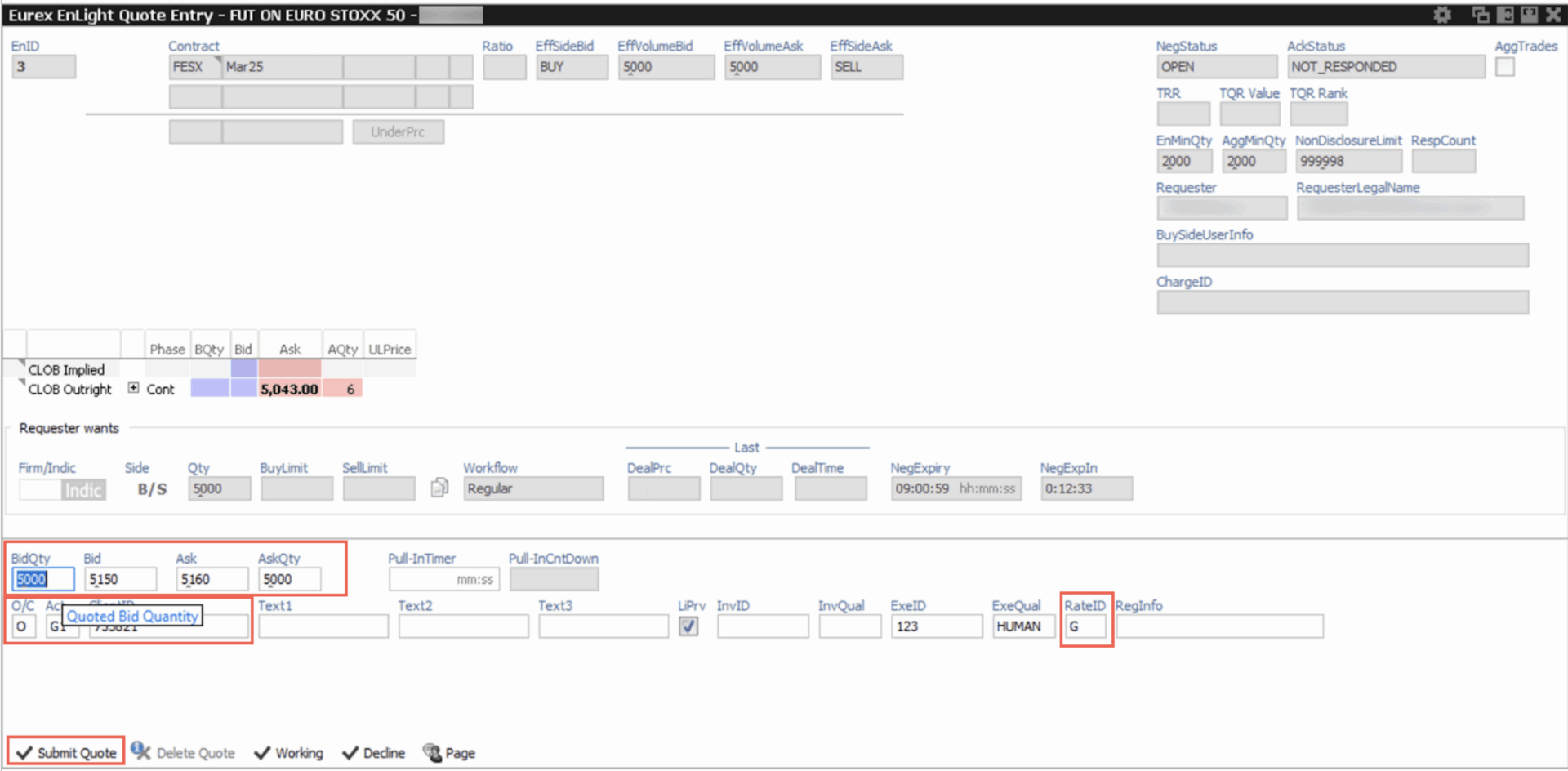
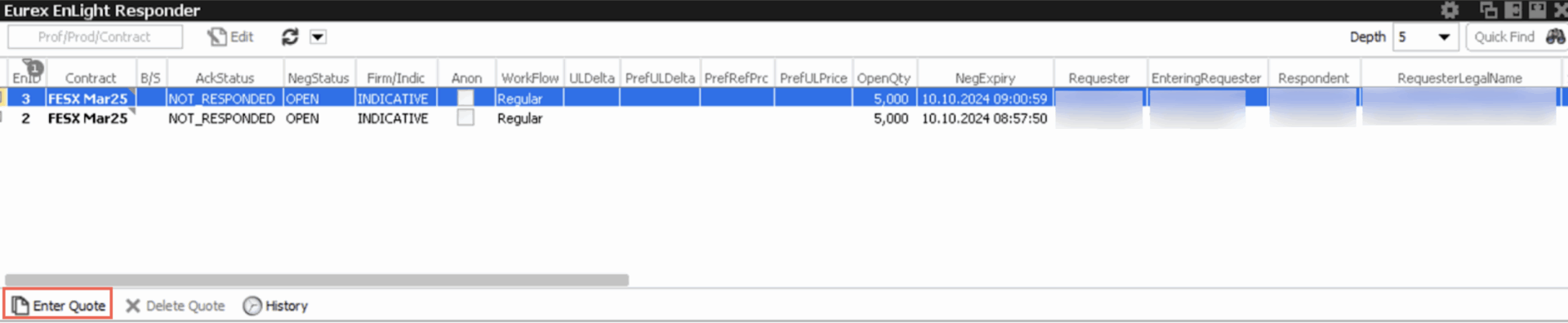
    This section illustrates the flow of events from the Eurex Trader Admin GUI – EnLight Responder interface from the respondent’s point of view. It briefly describes the steps needed to enter, submit and confirm the quote.

    1. When the requester submits the RFQ, the request is displayed in the Eurex EnLight Responder pane. Select the request and then click Enter Quote.

    2. Fill in the BidQty, Bid, Ask and AskQty fields. Also populate the O/C, Act, ClientID, ExeID, ExeQual, RateID and any other necessary fields

    3. Click Submit Quote and this will deliver the quote back to the requester.

    4. When the requester replies with the quote response (decision), it will be listed in the EnLight Deals pane.

    5. Select the quote response, check the details and click Confirm to finalize the deal.
    6. The requester will receive the confirmation messages.

    (back to top)

    FAQs

    1. Can you submit multiple members on an RFQ?
    2. Yes, on the Quote Request (35=R), use the NoTargetPartyIDs group to specify multiple members. E.g. |1461=2|1462=TTGXVZZZ003|1462=TTTXVDDE001|

    3. Can you fill a worse bid or ask, when receiving multiple quotes?
    4. Yes, you can respond to worse bid/ask quotes.

    5. Can you provide an RFQ with no counterparty?
    6. No, public RFQs are not allowed. A counterparty needs to be provided on each RFQ.

    7. Will the quotes from RFQs show on the market data feed?
    8. No. RFQs with counterparties are not publicly disseminated.

    9. What happens when the quote expires?
    10. The requester will receive a Quote Status Report (35=AI) with 297 (QuoteStatus)=7 to indicate that the quote has expired, followed by a quote with 18610 (QuotingStatus)=3 indicating that the status of the quote is closed and inactive.

      Example:

      Recv:
      8=FIX.4.2|9=00699|35=AI|49=TT_OR|56=Session123|34=4939|50=5498|142=SG|52=20241009-07:12:45.799|129=SubID123|131=1352684282|1=Account123|18221=DTS|18220=DTS|10553=traderemail@dotcom|16117=10|38=5000|54=1|60=20241009-07:12:45.760478|18605=5|1461=1|1462=TTGXVZZZ003|18606=bf4cf083-642f-4528-8571-bd8803f4cd9e|18607=1|297=7|16963=3|276=B|55=FESX|48=3188186039303792532|22=96|454=7|455=2519059|456=98|455=FESX Mar25|456=97|455=XF00000N8054|456=4|455=STXEH5|456=5|455=2519059|456=8|455=VGH5 Index|456=A|16207=EUX|455=BBG017Q95K87|456=S|16207=EUX|460=5|461=FFICSX|167=FUT|200=202503|541=20250320|205=20|18223=202503|18211=M|207=Eurex|100=XEUR|107=EURO STOXX 50 Index|15=EUR|453=1|448=TRAXVSIM003|452=218|447=D|10=111|

      Recv:
      8=FIX.4.2|9=00801|35=S|49=TT_OR|56=Session123|34=4940|52=20241009-07:12:45.799|129=SubID123|1=Account123|18221=DTS|18220=DTS|10553=traderemail@dotcom|1028=Y|132=5150|133=5155|134=5000|135=5000|1462=TTGXVZZZ003|18606=bf4cf083-642f-4528-8571-bd8803f4cd9e|18610=3|18607=1|18608=e3064549-3f8b-4b07-a4c2-96d0fd514010|16963=2|18609=1|60=20241009-07:12:45.762545|58=Purging EnLight / SRFQ market quotes for closed/expired SRFQ negotiation_id=bf4cf083-642f-4528-8571-bd8803f4cd9e|55=FESX|48=3188186039303792532|22=96|454=7|455=2519059|456=98|455=FESX Mar25|456=97|455=XF00000N8054|456=4|455=STXEH5|456=5|455=2519059|456=8|455=VGH5 Index|456=A|16207=EUX|455=BBG017Q95K87|456=S|16207=EUX|460=5|461=FFICSX|167=FUT|200=202503|541=20250320|205=20|18223=202503|18211=M|207=Eurex|100=XEUR|107=EURO STOXX 50 Index|15=EUR|10=092|

    (back to top)

    FIX Request for Quote

    Request for Quote Request & Successful Response

    RFQ request

    8=FIX.4.2 | 9=222 | 35=R | 34=11 | 49=MehulOR1 | 52=20230321-12:56:30 | 56=TT_ORDER | 1=mshaha_acc | 116=MShaha | 131=12908 | 146=1 | 167=MLEG | 207=CME | 55=ES | 555=2 | 600=ES | 602=635020 | 603=8 | 623=1 | 624=1 | 600=ES | 602=418320 | 603=8 | 623=10 | 624=2 | 566=401150 | 38=1190 | 54=1 | 10=212 |

    RFQ request response

    8=FIX.4.2 | 9=00244 | 35=b | 49=TT_ORDER | 56=MehulOR1 | 34=12 | 50=123 | 142=IN | 52=20230321-12:56:30.585 | 131=12908 | 1=mshaha_acc | 16859=0 | 18101=179424 | 18102=90866 | 16117=10 | 1028=N | 37=9eea7e19-2d80-462b-9084-3b43eda39860 | 38=1190 | 198=1679359083793 | 107=UD:1V:CFO 803011 | 54=1 | 582=1 | 10=109 |

    Request for Quote Request & Failure Responses

    RFQ request

    8=FIX.4.2 | 9=184 | 35=R | 49=MehulOR1 | 56=TT_ORDER | 34=2 | 116=MShaha | 52=20230306-17:24:07 | 11=76113544 | 60=20081223-20:10:33.145 | 1=mshaha_acc | 131=JS_RFQ_002 | 146=1 | 55=GE | 207=CME | 167=MLEG | 48=18361316052539033076 | 10=109 |

    RFQ rejected response

    8=FIX.4.2 | 9=00288 | 35=b | 49=TT_ORDER | 56=MehulOR1 | 34=3 | 50=123 | 142=IN | 52=20230306-17:24:07.706 | 131=JS_RFQ_002 | 1=mshaha_acc | 16859=5 | 18101=179424 | 18102=90866 | 16117=10 | 1028=N | 37=c54ffc2a-0885-45fc-bbbe-cfe4af35bd91 | 38=999999999999 | 198=1678084696241 | 107=GEZ7-GEZ0 | 58=Order qty exceeds the max value allowed. | 582=1 | 10=156 |

    FIX Strategy Creation

    Strategy Creation Request & Successful “as-is” and “with changes” Responses

    Security definition 35=c creation request

    8=FIX.4.2 | 9=205 | 35=c | 34=3 | 49=MehulOR1 | 52=20230109-09:35:48 | 56=TT_ORDER | 167=MLEG | 320=2 | 207=CME | 55=GE | 1=mshaha_acc | 116=MShaha | 555=2 | 600=GE | 602=249651 | 603=96 | 623=1 | 624=1 | 600=GE | 602=21064 | 603=96 | 623=1 | 624=1 | 566=9618 | 811=0.22 | 10=213 |

    Security definition 35=d response

    8=FIX.4.2 | 9=01060 | 35=d | 49=TT_ORDER | 56=MehulOR1 | 34=4 | 52=20230109-09:35:58.579 | 320=2 | 322=2 | 323=4 | 393=1 | 15=USD | 167=MLEG | 762=Covered | 55=GE | 107=Eurodollar Futures | 460=6 | 200=202309 | 541=20230901 | 205=1 | 9787=1 | 48=8610690892906721483 | 207=CME | 100=XCME | 461=M | 16552=0.5 | 16554=25 | 454=6 | 455=U$ | 456=99 | 455=UD:U$:CFO 0109807395 | 456=98 | 455=1xGE Sep23 10125 0.22xGE Sep24@9618 C Covered | 456=97 | 455=807395 | 456=8 | 455=13463009530246646819 | 456=93 | 455=11169539431571269395 | 456=92 | 864=2 | 865=5 | 866=20230109 | 865=6 | 866=20230109 | 555=2 | 600=GE | 602=8841739006101959054 | 620=Eurodollar Futures | 607=6 | 603=96 | 609=OPT | 610=202309 | 611=20230918 | 18314=18 | 612=10125 | 1358=1 | 616=CME | 18100=XCME | 608=OC | 624=1 | 623=1 | 556=USD | 18212=M | 18224=202309 | 604=5 | 605=ZE | 606=99 | 605=GEU3 C0125 | 606=98 | 605=GE Sep23 C10125 | 606=97 | 605=1ED10125I3 | 606=5 | 605=249651 | 606=8 | 600=GE | 602=6936802686862801409 | 620=Eurodollar Futures | 607=6 | 603=96 | 609=FUT | 610=202409 | 611=20240916 | 18314=16 | 616=CME | 18100=XCME | 608=FFDXSX | 624=1 | 623=0.22 | 556=USD | 566=9618 | 18212=M | 18224=202409 | 604=4 | 605=GEU4 | 606=98 | 605=GE Sep24 | 606=97 | 605=EDU24 | 606=5 | 605=21064 | 606=8 | 16451=0 | 10=217 |

    Strategy Creation Request & Failure Responses

    Security definition 35=c creation request

    8=FIX.4.2 | 9=217 | 35=c | 34=197 | 49=FIX_DEV |
    52=20221118-16:51:06 | 56=TT_ORDER | 167=MLEG | 320=1425 |
    207=CME | 55=GE | 1=LG-EUREX | 116=LGandhi |
    555=2
    | 600=GE | 602=317719 | 603=96 | 623=1 |
    624=1 | 600=GE | 609=FUT | 602=94636 | 603=96
    | 623=1 | 624=2 | 566=9780.00 | 1017=1 |
    10=237
    |

    Security definition 35=d response

    8=FIX.4.2 | 9=00244 | 35=d | 49=TT_ORDER |

    56=FIX_DEV
    | 34=201 | 50=OP123 | 142=IN |
    52=20221118-16:51:07.026
    | 320=1425 | 322=1425 |
    323=5
    |
    58=FIX field incorrect ‘Covering contract without delta: ‘GEM3”
    | 555=2 |
    602=16758494451134490642
    | 624=1 | 623=1 |
    602=8518679889488484758
    | 624=2 | 623=1 | 10=018 |

    Identifying instruments in order-routing messages

    This page outlines the various message tags used by FIX order routing sessions to identify instruments.

    FIX Tag Descriptions

    Tag Field Name Description
    48 SecurityID TT security ID that uniquely identifies the instrument in the TT platform.
    22 SecurityIDSource Source for the value of tag 48 (SecurityID).
    207 SecurityExchange Name of the market where the instrument trades.
    100 ExDestination Name of the sub-market where the instrument trades.
    55 Symbol Exchange-provided product symbol for the tradable product.
    167 SecurityType Asset class of the instrument.
    461 CFICode Type of security using ISO 10962 standard, Classification of Financial Instruments (CFI code) values. ISO 10962 is maintained by ANNA (Association of National Numbering Agencies) acting as Registration Authority.
    200 MaturityMonthYear Month and year the instrument reaches maturity in the format YYYYMM.
    205 MaturityDay Day of expiration for the instrument.
    202 StrikePrice Strike price for an option.
    201 PutorCall Whether the option represents a put or call.
    541 MaturityDate Maturity date in format YYYYMMDD.
    1194 ExerciseStyle Type of exercise for a derivatives security.
    454 NoSecurityAltID Number of alternate security IDs contained in this repeating group.
    >455 SecurityAltID Alternate ID for an instrument or security, typically for display purposes.
    >456 SecurityAltIDSource Identifies class or source of the SecurityAltID (455) value.
    >16207 BloombergSecurityExchange Name of the market where the instrument of the SecurityAltID (Tag 455) value trades.
    555 NoLegs Number of legs in the repeating group.
    >616 LegSecurityExchange Multi-leg instrument’s individual security’s SecurityExchange.
    >18100 LegExDestination Execution destination for the leg order as defined by the institution.
    >602 LegSecurityId TT security ID that uniquely identifies the instrument in the TT platform.
    >603 LegIDSource Multileg instrument’s individual security’s SecurityIDSource.
    >600 LegSymbol Multi-leg instrument’s individual security’s Symbol.
    >608 LegCFICode Multileg instrument’s individual security’s CFICode (tag 461).
    >609 LegSecurityType Multi-leg instrument’s individual security’s SecurityType.
    >764 LegSecuritySubType SecuritySubType of the leg instrument.
    >624 LegSide The side of this individual leg (multi-leg security).
    >610 LegMaturityMonthYear Multi-leg instrument’s individual security’s MaturityMonthYear
    >611 LegMaturityDate Multi-leg instrument’s individual security’s MaturityDate.
    >18314 LegMaturityDay Multi-leg instrument’s individual security’s MaturityDay.
    >612 LegStrikePrice Multi-leg instrument’s individual security’s StrikePrice.
    >1358 LegPutOrCall Whether the option represents a put or call.

    Order Routing Session Tag Usage

    SecurityID (Tag 48) and SecurityIDSource (Tag 22)

    SecurityIDSource (Tag 22) values supported by TT Usage
    96: TT security ID

    5: RIC code

    4: ISIN number

    X: Series key

    Unique identifier of an instrument and can be used on its own.
    A: Bloomberg code

    S: OpenFIGI ID

    Identifies instrument along with tag 207.
    8: Exchange symbol

    97: Alias

    98: Name

    Unique within a specific market; therefore, to avoid ambiguity either tag 207 (SecurityExchange) or 100 (ExDestination) is also required to identify the instrument.
    H: Clearing House (Inbound Drop Copy only)

    91: Ticker symbol

    Not applicable for order routing.

    Example 1 – ICE – BRN (Fut) by SecurityID using RIC 

    8=FIX.4.2 | 9=164 | 35=D | 49=USERABC_OR | 56=TT | 34=40 | 52=20251030-20:39:52 | 11=1892337812 | 54=1 | 40=1 | 38=10 | 1=Abraxas_P | 116=USERABC | 207=ICE | 21=1 | 55=BRN | 22=5 | 48=LCOQ6 | 10=178 |

    Example 2 – CME – ES (MLEG) by SecurityID using TT Security ID

    8=FIX.4.2 | 9=164 | 35=D | 49=USERABC_OR | 56=TT | 34=40 | 52=20251030-20:39:52 | 11=1892337812 | 54=1 | 40=1 | 38=10 | 1=Abraxas_P | 116=USERABC | 21=1 | 55=ES | 22=96 | 48=13575348896651708455 | 10=251 |

    Example 3 – ICE – BRN (Fut) by SecurityID using Bloomberg Code

    8=FIX.4.2 | 9=164 | 35=D | 49=USERABC_OR | 56=TT | 34=40 | 52=20251030-20:39:52 | 11=1892337812 | 54=1 | 40=1 | 38=10 | 1=Abraxas_P | 116=USERABC | 207=ICE | 21=1 | 55=BRN | 22=A | 48=COQ6 Comdty | 10=178 |

    Example 4 – ICE – BRN (Fut) by SecurityID using Exchange Symbol

    8=FIX.4.2 | 9=164 | 35=D | 49=USERABC_OR | 56=TT | 34=40 | 52=20251030-20:39:52 | 11=1892337812 | 54=1 | 40=1 | 38=10 | 1=Abraxas_P | 116=USERABC | 207=ICE | 21=1 | 55=BRN | 22=8 | 48=6018418 | 10=178 |

    8=FIX.4.2 | 9=164 | 35=D | 49=USERABC_OR | 56=TT | 34=40 | 52=20251030-20:39:52 | 11=1892337812 | 54=1 | 40=1 | 38=10 | 1=Abraxas_P | 116=USERABC | 100=IFEU | 21=1 | 55=BRN | 22=8 | 48=6018418 | 10=178 |

    SecurityAltID (Tag 455) and SecurityAltIDSource (Tag 456)

    SecurityAltIDSource (Tag 456) values supported by TT Usage
    5: RIC code

    4: ISIN number

    Unique identifier of an instrument and can be used on its own.
    A: Bloomberg code

    S: OpenFIGI ID

    Identifies instrument along with tag 16207.
    8: Exchange symbol

    97: Alias98: Name

    Unique within a specific market; therefore, to avoid ambiguity either tag 207 (SecurityExchange) or 100 (ExDestination) is also required to identify the instrument.
    1: CUSIP

    H: Clearing House (Inbound Drop Copy only)

    92: TT product family ID

    93: TT product ID

    99: Other

    94: Alt Symbol

    95: Clearport

    91: Ticker symbol

    Not applicable for order routing.

    Example 5 – CME – ES (Fut) by SecurityAltID using RIC

    8=FIX.4.2 | 9=164 | 35=D | 49=USERABC_OR | 56=TT | 34=40 | 52=20251030-20:39:52 | 11=1892337812 | 54=1 | 40=1 | 38=10 | 1=Abraxas_P | 116=USERABC | 207=CME | 21=1 | 55=ES | 454=1 | 455=ESU26 | 456=5 | 10=178 |

    Example 6 – CME – ES (Fut) by SecurityAltID using Bloomberg Code

    8=FIX.4.2 | 9=164 | 35=D | 49=USERABC_OR | 56=TT | 34=40 | 52=20251030-20:39:52 | 11=1892337812 | 54=1 | 40=1 | 38=10 | 1=Abraxas_P | 116=USERABC | 100=XCME | 21=1 | 55=ES | 454=1 | 455=ESZ6 Index | 456=A | 16207=CME | 10=178 |

    8=FIX.4.2 | 9=164 | 35=D | 49=USERABC_OR | 56=TT | 34=40 | 52=20251030-20:39:52 | 11=1892337812 | 54=1 | 40=1 | 38=10 | 1=Abraxas_P | 116=USERABC | 207=CME | 21=1 | 55=ES | 454=1 | 455=ESZ6 Index | 456=A | 10=178 |

    Symbol (Tag 55)

    If the security ID is not defined in the FIX message, the system uses the Symbol (Tag 55), along with SecurityType (Tag 167) or CFICode (Tag 461), MaturityMonthYear (Tag 200) and MaturityDay (Tag 205) or MaturityDate (Tag 541).

    Notes

    Example 7 – ICE – BRN (Fut) by Symbol

    8=FIX.4.2 | 9=164 | 35=D | 49=USERABC_OR | 56=TT | 34=40 | 52=20251030-20:39:52 | 11=1892337812 | 54=1 | 40=1 | 38=10 | 1=Abraxas_P | 116=USERABC | 207=ICE | 21=1 | 55=BRN | 167=FUT | 200=202608| 10=178 |

    8=FIX.4.2 | 9=164 | 35=D | 49=USERABC_OR | 56=TT | 34=40 | 52=20251030-20:39:52 | 11=1892337812 | 54=1 | 40=1 | 38=10 | 1=Abraxas_P | 116=USERABC | 100=IFEU | 21=1 | 55=BRN | 167=FUT | 200=202608| 10=178 |

    8=FIX.4.4 | 9=164 | 35=D | 49=USERABC_OR | 56=TT | 34=40 | 52=20251030-20:39:52 | 11=1892337812 | 54=1 | 40=1 | 38=10 | 1=Abraxas_P | 116=USERABC | 100=IFEU | 21=1 | 55=BRN | 461=FXXXXX | 200=202608| 10=178 |

    Example 8 – CME – ES (Opt) by Symbol

    8=FIX.4.2 | 9=164 | 35=D | 49=USERABC_OR | 56=TT | 34=40 | 52=20251030-20:39:52 | 11=1892337812 | 54=1 | 40=1 | 38=10 | 1=Abraxas_P | 116=USERABC | 21=1 | 207=CME | 55=ES | 167=OPT | 201=0 | 202=150000 | 541=20260320 | 10=027 |

    8=FIX.4.4 | 9=164 | 35=D | 49=USERABC_OR | 56=TT | 34=40 | 52=20251030-20:39:52 | 11=1892337812 | 54=1 | 40=1 | 38=10 | 1=Abraxas_P | 116=USERABC | 21=1 | 100=XCME | 55=ES | 461=OPXXXX | 201=0 | 202=150000 | 200=202603 | 205=20 | 10=143 |

    Example 9 – MEFF – ENC(Opt) by Symbol

    8=FIX.4.2 | 9=164 | 35=D | 49=USERABC_OR | 56=TT | 34=40 | 52=20251030-20:39:52 | 11=1892337812 | 54=1 | 40=1 | 38=10 | 1=Abraxas_P | 116=USERABC | 21=1 | 207=MEFF | 55=ENC | 167=OPT | 201=1 | 202=2.5 | 200=202510 | 205=17 | 1194=0 | 10=143 |

    8=FIX.4.2 | 9=164 | 35=D | 49=USERABC_OR | 56=TT | 34=40 | 52=20251030-20:39:52 | 11=1892337812 | 54=1 | 40=1 | 38=10 | 1=Abraxas_P | 116=USERABC | 21=1 | 207=MEFF | 55=ENC | 167=OPT | 201=1 | 202=2.5 | 541=20251017 | 1194=1 | 10=143 |

    LegInstrumentGrp (Tag 555)

    For multi-leg instruments (SecurityType=MLEG), the individual leg instruments can serve as an alternative means of identification.

    The tags within LegInstrumentGrp (Tag 555) correspond to tags found in the security ID and symbol sections. Either the security ID or symbol, along with the corresponding tags, need to be defined for each leg to identify the leg instruments.

    Example 10 – CME – ES (Spread) by Repeating Group Tag 555

    8=FIX.4.2 | 9=230 | 35=D | 49=USERABC_OR | 56=TT | 34=549 | 52=20251031-15:04:55 | 11=1314667219 | 54=2 | 40=2 | 44=120000 | 38=2 | 1=Abraxas_P | 116=USERABC | 55=ES | 207=CME | 167=MLEG | 762=Calendar | 555=2 | 600=ES | 602=ESU26 | 603=5 | 624=2 | 600=ES | 609=FUT | 610=202706 | 616=CME | 10=052 |

    Best Practices for Instrument Identification

    Order-routing message flows

    A FIX client starts an order-routing FIX session by sending a Logon (A) message to TT FIX and ends the session by calling the Logout (5) message. While connected to a FIX Order Routing session, a FIX client engages in a series of message conversations (requests and responses) with TT FIX to enter and manage orders. Typically, order-routing message conversations involve the following request and response messages.

    Requests Responses
    New Order Single (D)

    Order Cancel/Replace Request (G)

    Order Cancel Request (F)

    Execution Report (8)

    Order Cancel Reject (9)

    Common message conversation flows

    • Flows for exchange-listed instruments
    • Flows for multi-leg instruments
    • Flows for synthetic orders

    Flows for exchange-listed instruments

    The following illustration shows how a new order for an exchange-listed instrument is typically entered into the market and how the subsequent responses and requests track the order’s progress.

    1. The order-routing message flow begins with a FIX client submitting a New Order Single (D) message that enters an order in the market.
    2. When the exchange receives the New Order Single (D) request, it either:

      • Sends an Execution Report (8) message with tag 150=0 to acknowledge the order is working in the market.
      • Sends an Execution Report (8) message with tag 150=8 to indicate the exchange rejected the order request.
    3. While the order is working in the market, the following messages flows can occur:

      • (3A) As the working order receives fills, the exchange sends either:

        • Sends an Execution Report (8) message with tag 150=1 to indicate a fill occured for less than the total order quantity; the order continues to work in the market.
        • Sends an Execution Report (8) message with tag 150=2 to indicate that a fill occurred for the total order quantity; the order flow is complete.
      • (3B) At any point while the order is working, you can cancel it by submitting an Order Cancel Request (F) message.

        • (4B) If the cancel request is accepted, the exchange sends an Execution Report (8) message with tag 150=4 to indicate the order was canceled; the order flow is complete.
        • (4B) If the change request is rejected, the exchange sends an Order Cancel Reject (9) message; the existing order continues working in the market.
      • (3C) At any point while the order is working, you can change it by submitting an Order Cancel/Replace Request (G) message.

        • (4C) If the change request is accepted, the exchange sends an Execution Report (8) message with tag 150=5 to indicate the existing order was replaced.
        • (4C) If the change request is rejected, the exchange sends an Order Cancel Reject (9) message; the existing order continues working in the market.

    Flows for synthetic orders

    The following illustration shows how a new order for a synthetic is typically entered into the market and how the subsequent responses and requests track the order’s progress.

    Add Image

    1. The order-routing message flow begins with a FIX client submitting a New Order Single (D) message that enters an order in the market.
    2. When the exchange receives the New Order Single (D) request, it either:

      • Sends an Execution Report (8) message with tag 150=0 to acknowledge the order is working in the market.
      • Sends an Execution Report (8) message with tag 150=8 to indicate the exchange rejected the order request.

    Routing DMA orders to various exchanges

    Routing DMA orders using the TT FIX Order Routing Service involves a fix
    client submitting a
    New Order Single (D)
    message. TT FIX will respond with one of the following:

    • An
      Execution Report (8)
      message acknowledging the order
    • An Execution Report (8) message rejecting the order

    Note: A
    Business Message Reject (j)
    message can also be sent for business reasons, such as missing a field that is
    conditionally required.

    Routing DMA Orders

    Users may leverage TT FIX to submit Direct Market Access (DMA) orders.

    Examples of Routing Market, Limit, and Stop Orders

    CME GE using tag 55

    Sample Message

    8=FIX.4.2 | 9=175 | 35=D | 49=jerome | 56=ORDER | 34=14 | 52=20200624-15:15:37 | 11=1066820586 | 21=1 | 55=GE | 54=1 | 40=2 | 44=9824.00 | 38=4 | 1=jeromedc | 207=CME | 167=FUT | 200=202009 | 116=jhayes3 | 582=4 | 21=1 | 1031=W | 10=186 |
    8=FIX.4.2 | 9=00860 | 35=8 | 49=ORDER | 56=jerome | 34=582 | 50=JHAYES | 142=US,IL | 52=20200624-15:15:37.119 | 129=jhayes3 | 37=974918ca-3e73-46a2-8735-09bb0ee7249f | 198=821113537019 | 526=1592762431875 | 527=82681:2380900 | 11=1066820586 | 10011=3 | 453=3 | 448=1 | 452=200 | 447=D | 448=omnibus | 452=1 | 2376=22 | 447=D | 448=JEROMEDC | 452=83 | 447=D | 17=97hMpN997iyDncV1SJQw8w | 20=0 | 150=0 | 18=2 | 39=0 | 1=jeromedc | 55=GE | 107=Eurodollar Futures | 460=6 | 48=14856497881718443706 | 167=FUT | 200=202009 | 541=20200914 | 205=14 | 207=CME | 100=XCME | 461=FFDXSX | 15=USD | 18211=M | 54=1 | 38=4 | 40=2 | 44=9824 | 59=0 | 151=4 | 14=0 | 6=0 | 60=20200624-15:15:37.095000 | 442=1 | 1028=N | 18216=L18004 | 582=4 | [email protected] | 18220=DTS | 18221=DTS | 21=1 | 18223=202009 | 454=4 | 455=GEU0 | 456=98 | 455=GE Sep20 | 456=97 | 455=1EDU0 | 456=5 | 455=843520 | 456=8 | 16999=JEROMEDC | 16561=20200624-15:15:37.110834 | 16117=10 | 16612=97hMpN997iyDncV1SJQw8w | 18218= | 18226=0 | 1031=W | 10=189 |

    Tag Descriptions

    Use the following tags to help with order routing:

    Tag # Field Name Comments
    200 Maturity Date

    Indicated the year and month the instrument reaches maturity

    167 SecurityType

    Indicates the Security Definition for each leg (FUT)

    55 Symbol

    Sets the instrument as the CME Eurodollar contract

    CME (FUT) Stop Limit using OrdType tag 40

    Sample Message

    8=FIX.4.2 | 9=190 | 35=D | 34=25 | 49=WTEODTSOR | 52=20200731-02:36:55 | 56=TT_ORDER | 1=WTEO_DTS01 | 116=WTeoDTS | 11=559968237 | 167=FUT | 207=CME | 55=GE | 200=202012 | 38=10 | 40=4 | 44=9969.5 | 99=9970.0 | 54=2 | 59=0 | 60=20051205-09:11:59 | 10=006 |

    Tag Descriptions

    Use the following tags to help with order routing:

    Tag # Field Name Comments
    40 Order Type

    Sets the order type to Stop Limit

    59 Time in Force

    Set the time in force restriction to Day

    99 Stop Price

    Sets the value of the stop price

    OSE Market IOC using OrdType tag 40

    Sample Message

    8=FIX.4.2 | 9=171 | 35=D | 34=12 | 49=WTEODTSOR | 52=20200731-02:25:29 | 56=TT_ORDER | 1=WTEO_DTS01 | 116=WTeoDTS | 11=29907610 | 200=202009 | 167=FUT | 207=OSE | 55=NK225 | 38=1 | 40=1 | 54=1 | 59=3 | 60=20051205-09:11:59 | 10=120 |

    Tag Descriptions

    Use the following tags to help with order routing:

    Tag # Field Name Comments
    40 Order Type

    Sets the order type to Market Order

    59 Time in Force

    Set the time in force restriction to
    Immediate or Cancel (IOC)

    SGX Limit Order using OrdType tag 40

    Sample Message

    8=FIX.4.2 | 9=202 | 35=D | 34=33 | 49=WTEODTSOR | 52=20200709-02:21:50 | 56=TT_ORDER | 1=WTEO_DTS01 | 116=WTeoDTS | 11=50246697 | 48=16919685603007881189 | 55=NK | 167=FUT | 207=SGX | 200=202112 | 44=23000 | 54=1 | 38=10 | 40=2 | 59=1 | 60=20051205-09:11:59 | 10=119 |

    Tag Descriptions

    Use the following tags to help with order routing:

    Tag # Field Name Comments
    40 Order Type

    Sets the order type to Limit Order

    59 Time in Force

    Set the time in force restriction to
    Good Till Cancel (GTC)

    Routing Muti-Leg Instruments

    ASX Multiple Leg Bundle using SecurityType tag 167

    Sample Message

    8=FIX.4.2 | 9=570 | 35=D | 52=20200731-14:35:54 | 49=WTEODTSOR | 56=TT_ORDER | 34=747 | 11=548372122 | 1=WTEO_DTS01 | 116=WTeoDTS | 100=XSFE | 207=ASX | 167=MLEG | 55=BB | 44=90 | 38=17 | 40=2 | 54=1 | 59=0 | 77=0 | 60=20181016-15:17:16.000 | 762=Bundle | 555=8 | 600=BB | 609=FUT | 616=ASX | 610=202009 | 624=1 | 623=1 | 600=BB | 609=FUT | 616=ASX | 610=202012 | 624=1 | 623=1 | 600=BB | 609=FUT | 616=ASX | 610=202103 | 624=1 | 623=1 | 600=BB | 609=FUT | 616=ASX | 610=202106 | 624=1 | 623=1 | 600=BB | 609=FUT | 616=ASX | 610=202109 | 624=1 | 623=1 | 600=BB | 609=FUT | 616=ASX | 610=202112 | 624=1 | 623=1 | 600=BB | 609=FUT | 616=ASX | 610=202203 | 624=1 | 623=1 | 600=BB | 609=FUT | 616=ASX | 610=202206 | 624=1 | 623=1 | 10=165 |

    Tag Descriptions

    Use the following tags to help with order routing:

    Tag # Field Name Comments
    762 Security Sub Type

    Sets the security sub type to Bundle

    555 Number of Legs

    Set the number of legs for the spread.

    CME Multiple Leg Straddle using tag 167

    Sample Message

    8=FIX.4.2 | 9=337 | 35=D | 52=20200714-04:36:08 | 49=WTEODTSOR | 56=TT_ORDER | 34=1208 | 11=87183957 | 1=WTEO_DTS01 | 116=WTeoDTS | 100=CME | 207=CME | 167=MLEG | 55=6M | 44=3100 | 38=5 | 40=2 | 54=1 | 59=0 | 77=0 | 60=20181016-15:17:16.000 | 762=Straddle | 555=2 | 600=6M | 609=OPT | 616=CME | 610=202011 | 612=43000 | 1358=1 | 624=1 | 623=1 | 600=6M | 609=OPT | 616=CME | 610=202011 | 612=43000 | 1358=0 | 624=1 | 623=1 | 10=172 |

    Tag Descriptions

    Use the following tags to help with order routing:

    Tag # Field Name Comments
    762 Security Sub Type

    Sets the security sub type to Straddle

    555 Number of Legs

    Set the number of legs for the spread.

    CME Multiple Leg Strangle using tag 167

    Sample Message

    8=FIX.4.2 | 9=331 | 35=D | 52=20200731-13:54:10 | 49=WTEODTSOR | 56=TT_ORDER | 34=704 | 11=106682623 | 1=WTEO_DTS01 | 116=WTeoDTS | 100=XCME | 207=CME | 167=MLEG | 55=GE | 44=175 | 38=20 | 40=2 | 54=1 | 59=0 | 77=0 | 60=20181016-15:17:16.000 | 762=Strangle | 555=2 | 600=GE | 609=OPT | 616=CME | 610=202109 | 612=9800 | 1358=0 | 624=1 | 623=1 | 600=GE | 609=OPT | 616=CME | 610=202109 | 612=9812.5 | 1358=1 | 624=1 | 623=1 | 10=178 |

    Tag Descriptions

    Use the following tags to help with order routing:

    Tag # Field Name Comments
    762 Security Sub Type

    Sets the security sub type to Strangle

    555 Number of Legs

    Set the number of legs for the spread.

    Euronext Multiple Leg Butterfy Spread using tag 167

    Sample Message

    8=FIX.4.2 | 9=422 | 35=D | 52=20200731-14:14:33 | 49=WTEODTSOR | 56=TT_ORDER | 34=725 | 11=331623331 | 1=WTEO_DTS01 | 116=WTeoDTS | 100=XMON | 207=Euronext | 167=MLEG | 55=jPXA | 44=0.6 | 38=4 | 40=2 | 54=2 | 59=0 | 77=0 | 60=20181016-15:17:16.000 | 762=Butterfly | 555=3 | 600=jPXA | 609=OPT | 616=Euronext | 610=202103 | 612=54200 | 1358=1 | 624=1 | 623=1 | 600=jPXA | 609=OPT | 616=Euronext | 610=202103 | 612=54400 | 1358=1 | 624=2 | 623=2 | 600=jPXA | 609=OPT | 616=Euronext | 610=202103 | 612=54800 | 1358=1 | 624=1 | 623=1 | 10=049 |

    Tag Descriptions

    Use the following tags to help with order routing:

    Tag # Field Name Comments
    762 Security Sub Type

    Sets the security sub type to Butterfly

    555 Number of Legs

    Set the number of legs for the spread.

    ICE Multiple Leg Calendar Spread using tag 167

    Sample Message

    8=FIX.4.2 | 9=322 | 35=D | 52=20200715-07:56:04 | 49=WTEODTSOR | 56=TT_ORDER | 34=27 | 11=43458791 | 1=WTEO_DTS01 | 116=WTeoDTS | 207=ICE | 167=MLEG | 55=BRN | 44=0.93 | 38=1 | 40=2 | 54=1 | 59=0 | 77=0 | 60=20181016-15:17:16.000 | 762=Calendar | 555=2 | 600=BRN | 609=FUT | 616=ICE | 610=202007 | 611=20200731 | 624=1 | 623=1 | 600=BRN | 609=FUT | 616=ICE | 610=202010 | 611=20201030 | 624=2 | 623=1 | 10=058 |

    Tag Descriptions

    Use the following tags to help with order routing:

    Tag # Field Name Comments
    762 Security Sub Type

    Sets the security sub type to Calendar

    555 Number of Legs

    Set the number of legs for the spread.

    Routing Option Orders

    Eurex Outright Options using tag 167

    Sample Message

    8=FIX.4.2 | 9=211 | 35=D | 34=74 | 49=WTEODTSOR | 52=20200731-03:25:49 | 56=TT_ORDER | 1=WTEO_DTS01 | 116=WTeoDTS | 11=496906635 | 207=Eurex | 167=OPT | 55=ODAX | 200=202008 | 201=1 | 202=10500 | 38=80 | 40=2 | 44=8461 | 54=1 | 59=6 | 432=20200830 | 60=20051205-09:11:59 | 10=191 |

    Tag Descriptions

    Use the following tags to help with order routing:

    Tag # Field Name Comments
    201 Put or Call

    Indicated order is a call option

    202 Strike Price

    Set the value of the strike price

    Routing Option Orders

    Routing option orders using the TT FIX Order Routing Service involves a fix client submitting a New Order Single (D) message. TT FIX will respond with one of the following:

    • An Execution Report (8) message acknowledging the order
    • An Execution Report (8) message rejecting the order

    Note: A Business Message Reject (j) message can also be sent for business reasons, such as missing a field that is conditionally required.

    Routing Option Orders

    Eurex Outright Options using tag 167

    Sample Message

    8=FIX.4.2 | 9=211 | 35=D | 34=74 | 49=WTEODTSOR | 52=20200731-03:25:49 | 56=TT_ORDER | 1=WTEO_DTS01 | 116=WTeoDTS | 11=496906635 | 207=Eurex | 167=OPT | 55=ODAX | 200=202008 | 201=1 | 202=10500 | 38=80 | 40=2 | 44=8461 | 54=1 | 59=6 | 432=20200830 | 60=20051205-09:11:59 | 10=191 |

    Tag Descriptions

    Use the following tags to help with order routing:

    Tag # Field Name Comments
    201 Put or Call

    Indicated order is a call option

    202 Strike Price

    Set the value of the strike price

    Routing Option Orders

    Eurex Outright Options using tag 167

    Sample Message

    8=FIX.4.2 | 9=211 | 35=D | 34=74 | 49=WTEODTSOR | 52=20200731-03:25:49 | 56=TT_ORDER | 1=WTEO_DTS01 | 116=WTeoDTS | 11=496906635 | 207=Eurex | 167=OPT | 55=ODAX | 200=202008 | 201=1 | 202=10500 | 38=80 | 40=2 | 44=8461 | 54=1 | 59=6 | 432=20200830 | 60=20051205-09:11:59 | 10=191 |

    Tag Descriptions

    Use the following tags to help with order routing:

    Tag # Field Name Comments
    201 Put or Call

    Indicated order is a call option

    202 Strike Price

    Set the value of the strike price

    Privacy Overview

    This website uses cookies so that we can provide you with the best user experience possible. Cookie information is stored in your browser and performs functions such as recognising you when you return to our website and helping our team to understand which sections of the website you find most interesting and useful.

    Strictly Necessary Cookies

    Strictly Necessary Cookie should be enabled at all times so that we can save your preferences for cookie settings.

    Analytics

    This website uses Google Analytics to collect anonymous information such as the number of visitors to the site, and the most popular pages.

    Keeping this cookie enabled helps us to improve our website.

    Marketing

    This website uses the following additional cookies:

    (List the cookies that you are using on the website here.)