
FIX Exchange Tag Reference
FIX Migration Reference
The reference below provides important FIX tag mappings between different exchanges and TT FIX. You can click the name of the exchange listed below to see all mappings specific to that exchange.








The reference below provides important FIX tag mappings between different exchanges and TT FIX. You can click the name of the exchange listed below to see all mappings specific to that exchange.
TT supports SSL-wrapped TCP connections for FIX connections. TT encrypted FIX utilizes server-side certificates only, similar to how most Secure HTTP (https) websites are implemented. Client certificates are not utilized or checked; client authentication occurs at the FIX protocol level utilizing SenderCompID in FIX tag 49 and password in FIX tag 96.
If your FIX engine natively supports SSL encryption, please consult the documentation for your FIX engine for configuration details. TT provides the TTFIX.crt file with the public certificates used by the TT® Platform FIX endpoint for customers’ use to minimize the risk of a Man-in-the-Middle attack.
If your FIX engine does not natively support SSL encryption, TT recommends using the open source stunnel proxy to implement the SSL encryption wrapper. Stunnel is available from https://www.stunnel.org/ and supports multiple operating systems, including Linux and Windows. Stunnel encrypts only the individual FIX connection, rather than implementing a full VPN tunnel as was traditionally used to encrypt FIX.
Before connecting your FIX client to TT FIX, the company administrator must create the FIX sessions that your FIX client will use. To create a FIX session:
For more information, see Adding and Configuring a FIX Session.
FIX clients can connect to TT FIX over a Secure TCP (SSL) connection using the following information. FIX clients can connect to the TT UAT environment via the Internet or stunnel; for the TT Production environment, clients can use stunnel.
| UAT | Production | |
|---|---|---|
| FIX Drop Copy | fixdropcopy-ext-uat-cert.trade.tt: 11501 / 11701 | fixdropcopy-ext-prod-live.trade.tt: 11701 |
| FIX Inbound Drop Copy | fixdropcopy-ext-uat-cert.trade.tt: 11506 / 11706 | fixdropcopy-ext-prod-live.trade.tt: 11706 |
| FIX Order Routing | fixorderrouting-ext-uat-cert.trade.tt: 11502 / 11702 | fixorderrouting-ext-prod-live.trade.tt: 11702 |
| FIX Market Data | fixmarketdata-ext-uat-cert.trade.tt: 11503 / 11703 | fixmarketdata-ext-prod-live.trade.tt: 11703 |
| FIX Recovery (Drop Copy) | fixrecovery-ext-uat-cert.trade.tt: 11505 / 11705 | fixrecovery-ext-prod-live.trade.tt: 11705 |
| FIX Recovery (Order Routing) | fixrecovery-ext-uat-cert.trade.tt: 11508 / 11708 | fixrecovery-ext-prod-live.trade.tt: 11708 |
| FIX Drop Copy (out) | fixdropcopy-ext-prod-sim.trade.tt: 11701 |
To configure connections for stunnel:
Install the stunnel software, if necessary.
Note: The first time you install stunnel, you might receive a prompt similar to the following. If so, simply enter the appropriate information for your location and organization.
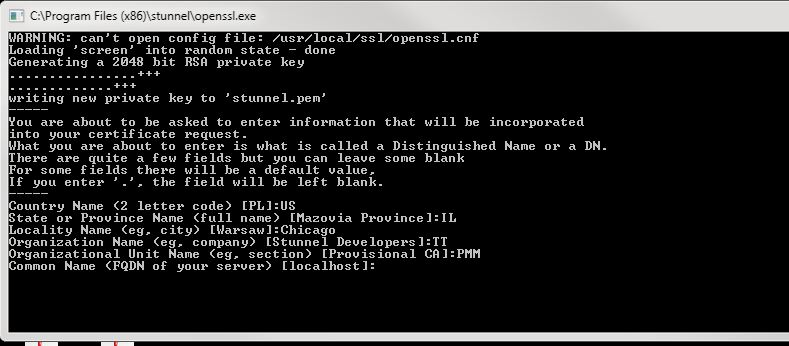
Download TT’s stunnel.zip file.
The zip file contains the TTFIX.crt public cert file and a sample stunnel client configuration file.
Copy the TTFIX.crt file to the appropriate location on your system.
Add the following to the stunnel configuration:
For TT FIX Drop Copy sessions:
[dcfix-tcp]

              client = yes

              accept = 127.0.0.1:11701

              connect = FullyQualifiedDomainName:port

              CAfile = TTFIX.crt

              verify = 3
where FullyQualifiedDomainName:port uses one of the values from the table above.
FIX clients should use the following connection information:
Host: 127.0.0.1
Port: 11701
For TT FIX Inbound Drop Copy sessions:
[dcfix-tcp]

              client = yes

              accept = 127.0.0.1:11706

              connect = FullyQualifiedDomainName:port

              CAfile = TTFIX.crt

              verify = 3
where FullyQualifiedDomainName:port uses one of the values from the table above.
FIX clients should use the following connection information:
Host: 127.0.0.1
Port: 11706
For TT FIX Order Routing sessions:
[orfix-tcp]

              client = yes

              accept = 127.0.0.1:11702

              connect = FullyQualifiedDomainName:port

              CAfile = TTFIX.crt

              verify = 3
where FullyQualifiedDomainName:port uses one of the values from the table above.
FIX clients should use the following connection information:
Host: 127.0.0.1
Port: 11702
For TT FIX Market Data sessions:
[mdfix-tcp]

              client = yes

              accept = 127.0.0.1:11703

              connect = FullyQualifiedDomainName:port

              CAfile = TTFIX.crt

              verify = 3
where FullyQualifiedDomainName:port uses one of the values from the table above.
FIX clients should use the following connection information:
Host: 127.0.0.1
Port: 11703
For TT FIX Recovery (Drop Copy) sessions:
[recoveryfix-tcp]

                        client = yes

                        accept = 127.0.0.1:11705

                        connect = FullyQualifiedDomainName:port

                        CAfile = TTFIX.crt

                        verify = 3
where FullyQualifiedDomainName:port uses one of the values from the table above.
FIX clients should use the following connection information:
Host: 127.0.0.1
Port: 11705
For TT FIX Recovery (Order Routing) sessions:
[recoveryfix-tcp]

                        client = yes

                        accept = 127.0.0.1:11708

                        connect = FullyQualifiedDomainName:port

                        CAfile = TTFIX.crt

                        verify = 3
where FullyQualifiedDomainName:port uses one of the values from the table above.
FIX clients should use the following connection information:
Host: 127.0.0.1
Port: 11708
For TT FIX Drop Copy (out) sessions:
[dcofix-tcp]

              client = yes

              accept = 127.0.0.1:11701

              connect = FullyQualifiedDomainName:port

              CAfile = TTFIX.crt

              verify = 3
where FullyQualifiedDomainName:port uses the value from the table above.
FIX clients should use the following connection information:
Host: 127.0.0.1
Port: 11703
All connections through these ports are encrypted. Port 443 is also open for these URLs.
FIX services are available 24/7 except during software deployments, which occur Friday evenings approximately every two weeks for UAT environments and monthly for Production environments.
TT FIX Order Routing sessions are persistent by default and reset on Saturdays
at 22:00 UTC.
Clients may optionally define a custom daily reset time when configuring a FIX
Order Routing session in Setup.
Note: If a FIX client remains connected to a FIX session when either the default or custom scheduled reset time occurs, TT’s FIX engine will send a Logout message.
By default, message sequence numbers for FIX sessions are reset when TT resets all FIX sessions. Message sequence numbers can also be reset, when desired, by setting Tag 34 (MsgSeqNum) = 1 and Tag 141 (ResetSeqNumFlag) = Y when sending a Logon (A) message.
TT FIX will ensure ClOrdID (tag 11) uniqueness for:
For more information, refer to the ClOrdID tag description in the New Order Single (D) message.
If your FIX client application disconnects and subsequently reconnects, TT’s
FIX engine will perform an internal recovery process to query our cloud based
order book database and will deliver all unsent execution reports by applying
an incremental sequence number that picks up where we left off prior to the
disconnect. The session recovery process can be considered complete in all
cases with a News message [35=B].
This eliminates the requirement for your FIX client application to detect a
gap on the session level and request missed execution reports while
disconnected. This also allows FIX client applications to failover seamlessly
into a different datacenter without sequence number consideration.
If your FIX client application disconnects and was unable to process
executions prior to the disconnect, TT’s FIX engine supports the standard
message replay mechanism specified by the FIX Protocol by honoring Resend
Request [2] messages received from FIX client applications.
In extreme cases where your FIX client application unexpectedly disconnected
and required intervention on your side to reset sequence numbers that resulted
in a subsequent Logon with 141=Y and 34=1, TT’s FIX engine will still perform
a session recovery process that will query our cloud based order book database
for executions marked as undelivered and apply an incremental sequence number
to each message message. In this case, Logon [34=1], missed executions [34=2,
3, etc]. The session recovery process can be considered complete in all cases
with a News message [35=B].
In the scenario where although TT delivered all relevant execution reports to
your FIX client application, your internal system may have experienced an
issue and was unable to process the messaging. TT’s FIX Engine is aware of
sent messages, but we are unaware of your application’s success or failure to
process them. If your FIX client application also required a sequence number
reset and cannot request a Resend Request [2] message, executions can be
retrieved through our REST API [link to REST].
In order to add support CME Drop Copy 4.0 in the TT Inbound Drop Copy service, tags 5024 and 5979 have been added to the TT XML schema Service as shown:
<field number=’5024′ name=’StartSequenceNumber’ type=’SEQNUM’ />
<field number=’5979′ name=’RequestTime’ type=’STRING’ />
These tags will not appear in any messages used by TT standard outbound drop copy service or any other customer-facing FIX interfaces.
No customer action is required regarding these tags.
The FIX schema now includes the optional FIX Tag 18001. This optional tag is available in all order and execution report messages. In addition, these tags will not appear in any current messages in production and are reserved for future use.
FIX Order router now routes “Instrument Not Found” rejects to the Drop Copy session. The message appears in Tag 58 (Text) and includes the instrument lookup field (e.g., instrument_id, Name, Alias, RIC_Code, ect.) and value.
If a valid account and user exist on the order, the FIX Order Router will use those values, otherwise, it will use the Error Account + default user.
The IFOA mitigation system does the following:
FIX tags in Logon messages are validated such that any tags not valid for the FIX version of the Logon message will be rejected. For example, if a customer FIX 4.2 Logon message contains a FIX tag that is valid for FIX 4.4 but not FIX 4.2, that logon will be rejected.
TT receives execution reports (ERs) from multiple exchanges and publishes these to clients via TT FIX Drop Copy. When exchanges send unsolicited ERs in response to an IOC/FOK order, EOD expiration or other exchange-initiated event, some will set ExecType/OrdStatus on such ERs to Canceled (39=4; 150=4), while others set it as Expired (39=C; 150=C), or others may use a mix (39=4; 150=C).
In order to improve consistency across exchanges, TT Order Connectors normalize ExecType and OrdStatus for unsolicited execution reports as follows:
The TT FIX service allows customers to receive real-time copies of all of their orders submitted through the TT
platform, along with their corresponding fills. To use this service, customers must develop FIX clients capable
of connecting to and communicating with the TT FIX.
TT FIX supports a subset of the FIX protocol (Version 4.2 with Errata 20010501 and Version 4.4) message types and
tags within its message types. Refer to the website http://www.fixtradingcommunity.org/ for additional FIX tag descriptions and message
definitions.
The second line of each TT FIX schema file contains an XML comment that identifies the schema’s publication date
and internal version information, similar to the following.
<!-- TT FIX Version: UAT 10:25:17 Git:16bc4b86e3c94bef40c3dc55c5314c16df9c9930 MD5:998190c7d44e5636f42569d1279400ee -->
Both production and UAT versions of the TT FIX schema are available for download at the links below.
TT currently supports two formats of the FIX 4.2 (Prod) and FIX 4.4 (Prod) schemas.
All of the Production schemas contain the recent enhancements listed in the release notes.
The Legacy Schemas use the older format while containing the recent enhancements listed in the release notes.
The new Component Schemas have been redesigned to support a component-based format of the schema. These schemas also contain the recent enhancements listed in the release notes.
This new approach will be available as the default format of the FIX schemas in future releases.
TT currently supports two formats of the FIX 4.2 (UAT) and FIX 4.4 (UAT) schemas.
All of the UAT schemas contain the recent enhancements listed in the release notes.
The Legacy Schemas use the older format while containing the recent enhancements listed in the release notes.
The new Component Schemas have been redesigned to support a component-based format of the schema. These schemas also contain the recent enhancements listed in the release notes.
This new approach will be available as the default format of the FIX schemas in future releases.
FIX applications connecting to TT FIX services are required to complete TT’s FIX Certification. Successfully completing the FIX Certification process will ensure that your FIX application works as expected in our live production environment.
FIX applications can complete TT’s FIX Certification through five easy steps:
UAT FIX client connectivity is available via the Internet or Stunnel (secure Internet).
TT supports SSL-wrapped TCP connections for FIX connections. TT encrypted FIX utilizes server-side certificates only, similar to how most Secure HTTP (https) websites are implemented. Client certificates are not utilized or checked; client authentication occurs at the FIX protocol level utilizing SenderCompID in FIX tag 49 and password in FIX tag 96.
If your FIX engine natively supports SSL encryption, please consult the documentation for your FIX engine for configuration details. TT provides the stunnel.zip file which contains the TTFIX.crt. This file contains the public certificates utilized by the TT Platform’s FIX endpoints for customers’ use to minimize the risk of a Man-in-the-Middle attack.
If your FIX engine does not natively support SSL encryption, TT recommends using the open source stunnel proxy to implement the SSL encryption wrapper. Stunnel is available from https://www.stunnel.org/ and supports multiple operating systems, including Linux and Windows. Stunnel encrypts only the individual FIX connection, rather than implementing a full VPN tunnel as was traditionally used to encrypt FIX.
Your company on-premises DNS services must be able to access public DNS entries below pending the connection method:
| Internet | Stunnel | |
|---|---|---|
| FIX Drop Copy | fixdropcopy-ext-uat-cert.trade.tt: 11501 | fixdropcopy-ext-uat-cert.trade.tt: 11701 |
| FIX Order Routing | fixorderrouting-ext-uat-cert.trade.tt: 11502 | fixorderrouting-ext-uat-cert.trade.tt: 11702 |
| FIX Market Data | fixmarketdata-ext-uat-cert.trade.tt: 11503 | fixmarketdata-ext-uat-cert.trade.tt: 11703 |
| FIX Recovery (Drop Copy) | fixrecovery-ext-uat-cert.trade.tt: 11505 | fixrecovery-ext-uat-cert.trade.tt: 11705 |
| FIX Recovery (Order Routing) | fixrecovery-ext-uat-cert.trade.tt: 11508 | fixrecovery-ext-uat-cert.trade.tt: 11708 |
Sample Stunnel configurations are available here.
A company administrator must add and create the FIX session in User Setup.
Adding and Configuring a FIX Session:
https://library.tradingtechnologies.com/user-setup/fxs-adding-and-configuring-a-fix-session.html
The administrator must add Users to Order Routing FIX sessions.
Adding a User to an Order Routing FIX Session:
https://library.tradingtechnologies.com/user-setup/fxs-assigning-a-user-to-a-fix-session.html
The administrator must add Accounts to Back Office FIX sessions.
Adding an Account to a Drop Copy FIX Session:
https://library.tradingtechnologies.com/user-setup/fxs-assigning-an-account-to-a-fix-session.html
Developers should begin to develop against TT’s FIX spec:
http://library.tradingtechnologies.com/tt-fix/general/System_Overview.html
Don’t support a FIX tag? Need to add an unsupported FIX tag or remap a tag’s value to another tag? Want to change symbology?
To assist in simplifying the integration effort, TT offers a FIX Rules Engine that allows your company’s administrator to define rules as well as symbol mappings.
Administering FIX Rulesets:
https://library.tradingtechnologies.com/user-setup/fxp-administering-fix-rulesets.html
Configuring FIX Rules:
https://library.tradingtechnologies.com/user-setup/fxp-configuring-fix-rules.html
Defining Symbol Mappings:
https://library.tradingtechnologies.com/user-setup/fxp-defining-symbol-mappings.html
The FIX Certification process aims to meet each client’s specific testing needs. We encourage the client to run through testing scenarios that would closely resemble behavior specific to their application in Production. As such, the client should submit orders with the same characteristics as would be expected in Production (order types, TIFs and exchanges).
To provide some structure and guidance during the conformance process, we have provided a basic test outline for both Drop Copy and Order Routing FIX client apps. Please note that these are only suggestions. The outline does not cover all supported order types & TIFs. For more information on what is supported by each exchange, please see Supported Order Types and TIFs.
Download the Order Routing Test Outline here.
Execution of Tests:
Download the Drop Copy Test Outline here.
Execution of Tests:
Once you have submitted your test data, our FIX Integration team will review your orders and provide relevant feedback and recommendations. We will point out certain exchange specific behaviors that you may not have been aware of. Our objective is to advise on best practices to minimize disruptions and ensure a smooth trading experience when you move into Production.
Do ensure the FIX Integration e-mail ([email protected]) is added on all corresponding emails so that someone from our global team can assist if another is not available.
When the above tests are completed, we will then request that you complete Session-Level tests. The purpose of this is to ensure your application can handle sequence number mis-matches during certain logon scenarios. This can be done in real-time by following the instructions in our TT FIX Session-level Tests document.
Once the Session Level tests are completed, we would proceed to certify you as having passed conformance for T FIX. By which you may then proceed into getting set up for Production.
Please contact our global FIX Integration team for assistance with your development needs, or by email at [email protected].